
This Tributary review looks at a very young, free git client: Tributary is a desktop app for macOS, Windows and Linux, draws history as a coloured graph, and can compare picture files as pictures rather than as binary blobs. The repository is at github.com/shikoko/tributary, and the product site is at shikoko.github.io/tributary. We downloaded the current stable release, 0.17.1 (published 23 November 2026 at 16:50 Europe/Berlin), as a Linux AppImage, checked the SHA-256 digest from the release page, and opened a small local test repository in the app. We did not test Git LFS, file locks, pull requests, GitHub or GitLab sign-in, or Undo after a rebase. Where we rely only on the documentation, we say so.
Tributary review: what is the client?
Tributary is not a new version-control system. It is a desktop client for the git you already have. According to the README, it reads history directly with gitoxide, draws only the graph rows that are on screen, and runs changes to commits, branches and the working tree through your own git, “exactly as on the command line”. Readers who first want a grounding in Git and GitHub may prefer our guide Git and GitHub for Beginners.
The pitch has two sides. Developers get a clear graph, syntax-coloured diffs and a command palette. Artists, designers and teams with large binary files are meant to see textures, models and sounds as what they are. A Simple mode hides the graph and keeps the focus on “Get latest”, your changes and “Submit”. We did not switch that mode on in the running app; it is documented on the website and in the README.
Who builds it?
The author and maintainer is Bogdan Roatis (GitHub: shikoko). The MIT licence names the same person. The public repository was created on 6 November 2026 at 17:14 Europe/Berlin. The project describes itself as one person working in their spare time, with no ads and no tracking. Support is through GitHub Sponsors.
The pace is brisk: only 17 days passed between the public repository and the 0.17.1 release we tested, and there is a separate beta channel. On 23 November 2026 (evening, Europe/Berlin) the GitHub API reported 122 stars, 6 forks, 2 open issues (both Windows feature requests) and about 782 commits on the default branch develop. Stars are not a quality score, but they show early visibility. Two pull requests were open at the time, including a Russian translation and a Dependabot update; we did not review them in detail.
Core features from the docs and our install
Start screen and the commit graph
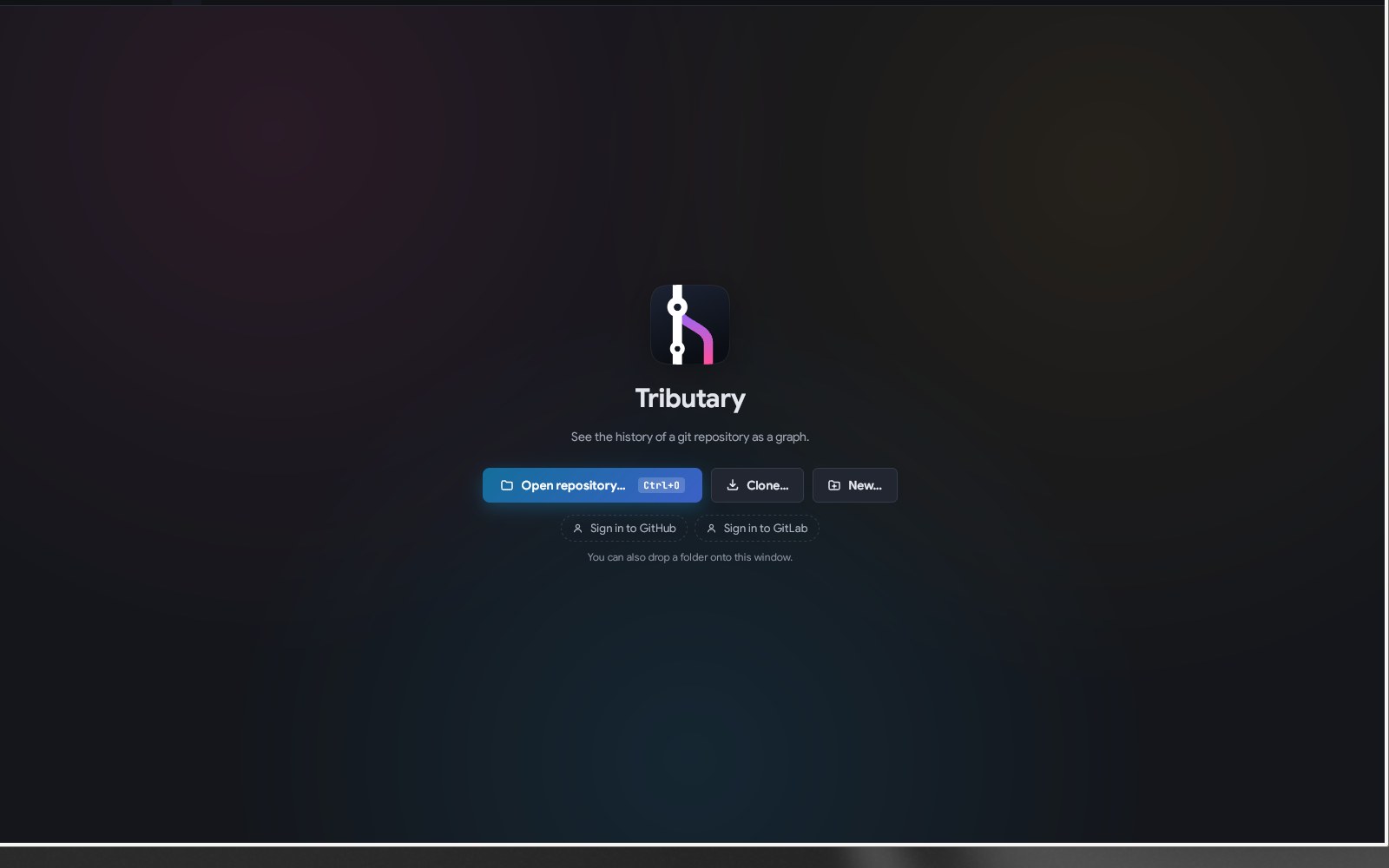
On launch, Tributary shows a dark start screen with “Open repository…” (Ctrl+O), “Clone…” and “New…”, plus optional sign-in to GitHub and GitLab. A note says you can also drop a folder onto the window. We did not sign in.
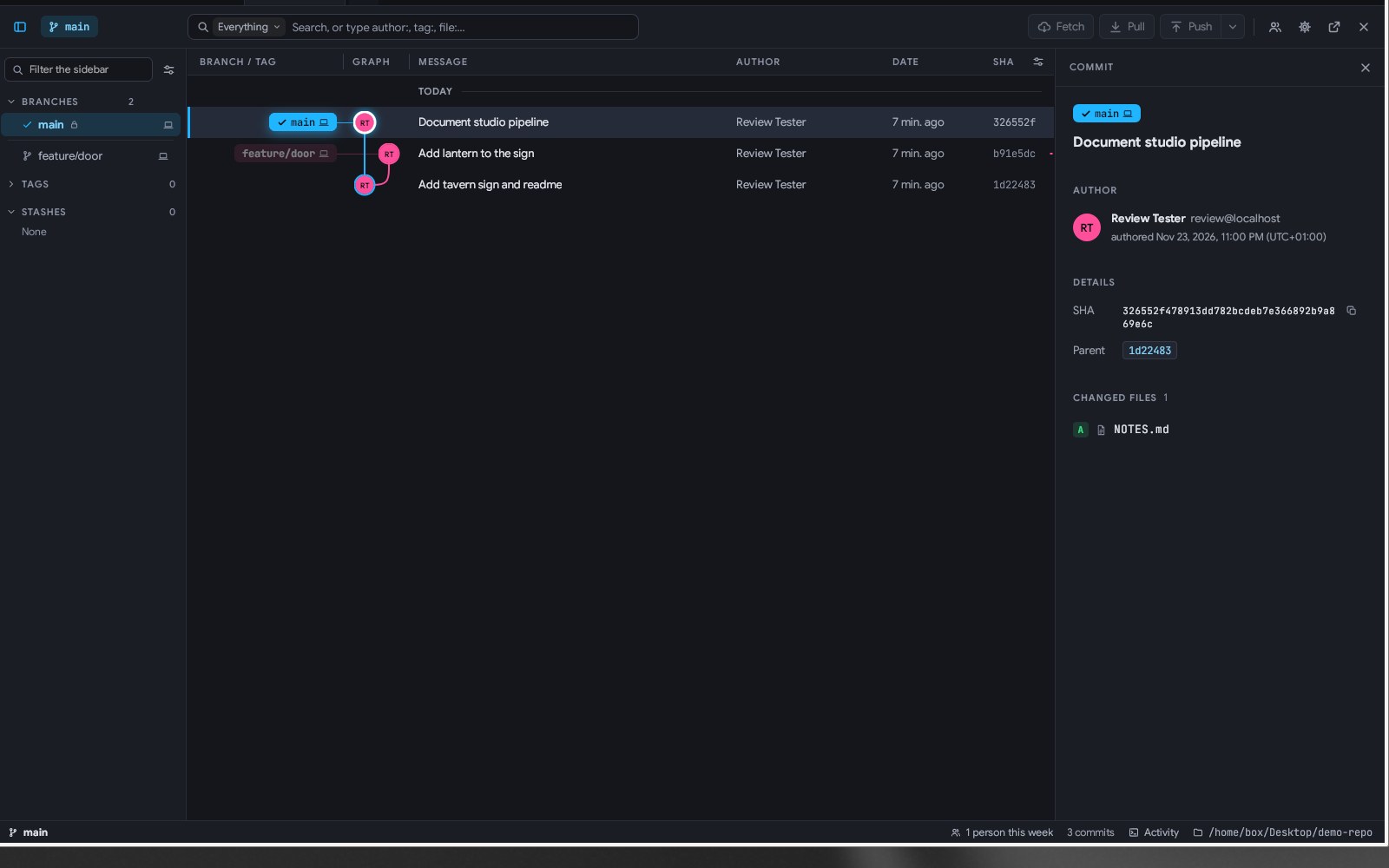
Our test repository had three commits on two branches (main and feature/door) plus a PNG file. The graph gave each branch its own colour and lane, labelled the tips, and showed author, SHA, parent commit and changed files on the right. The sidebar listed branches, tags and stashes; search sat at the top, with Fetch, Pull and Push beside it. The first click in the graph opened a guided tour (“Getting started · 1 of 5”). We skipped it. The README describes these tours as short, offered once, and easy to turn off.
Art diffs for pictures
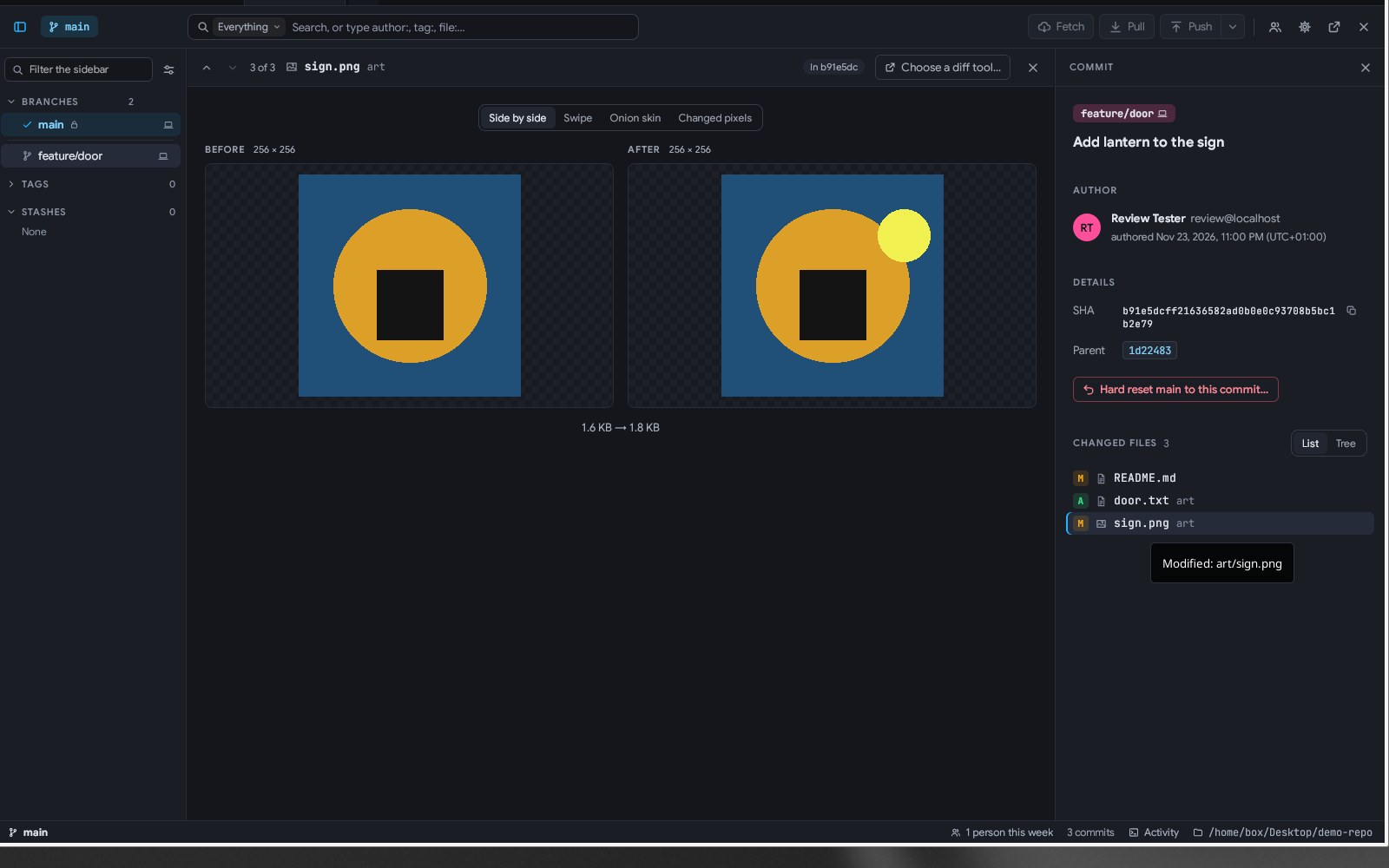
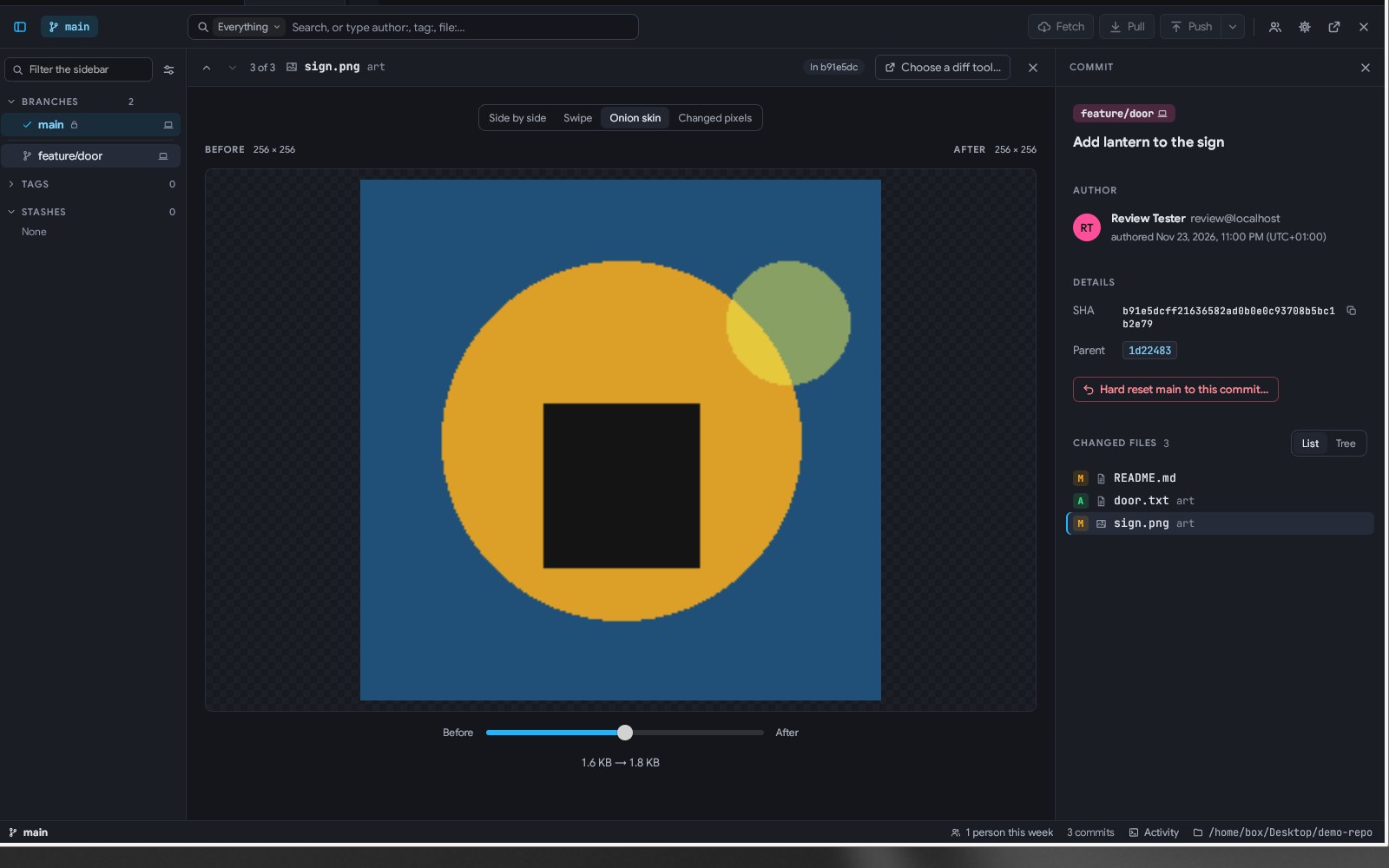
For the changed file sign.png, Tributary opened a picture comparison rather than a binary view. We saw two modes ourselves: “Side by side”, with Before and After at 256 × 256 pixels and a size of 1.6 KB → 1.8 KB, and “Onion skin”, with a slider between Before and After that lays the new yellow shape over the original at partial opacity. The “Swipe” and “Changed pixels” controls were visible; we did not capture a clean screenshot of those two modes. The documentation also lists PSD, TGA, DDS, EXR, SVG, Blender and Unreal thumbnails, plus 3D models, sounds and video. We did not test those formats.
Settings, safety nets and team features
The gear icon opened “Settings for demo-repo”, with sections for Commits, Signing, Remotes, Issues, Branches, Folders, Speed and Git LFS. The commit author was taken from our git config, and a message template was pre-filled. We did not change or save anything there.
Documented, but not exercised by us, are Undo for rebases, merges, resets and deletes, including discarded changes that were never committed; backups of branches before they are rewritten or deleted; local snapshots of uncommitted work under refs/tributary/snapshots/ (they are never pushed); pull requests, reviews and CI checks in the app for GitHub and GitLab; Git LFS downloads with a disk-space check and file locks; and shelves under refs/tributary/shelves/ on the remote. We did not put a large game or art repository through a working day in the app.
Platforms and install
The 0.17.1 release page ships a universal macOS disk image (Apple Silicon and Intel), Windows installers for x64 and ARM, and Linux AppImages for amd64 and aarch64. After install, Tributary is documented as updating itself. It needs git, and Git LFS for repositories that use it.
Our amd64 AppImage of 0.17.1 (about 92 MB) started on Linux without an extra permission step. The installers are not code-signed yet, so the first launch on macOS or Windows needs an extra step in system settings or SmartScreen, according to the project. From 0.17.1 you can check that a file you downloaded was built from the repository with the GitHub CLI: gh attestation verify and the file name, repository shikoko/tributary. The release notes say the Linux build is less tested than the Mac and Windows ones; reports are welcome.
A practical note from our Linux test: in the GTK dialog “Open a git repository”, the Open button stayed inactive until a folder was selected in the list. Typing a path could show the contents, but that alone did not enable Open. It slowed us down briefly and is more typical of this kind of dialog than a clear bug in the app.
License, cost and privacy
The licence in the repository is MIT. Tributary is free, with no subscription and no built-in ads. The README is explicit that there is no warranty, and that work you cannot afford to lose should also live on a remote and in backups.
The PRIVACY.md file is short and specific: no analytics, no crash reporting, no account with the project. The app talks only to services you already use: remotes through your own git, an update check against GitHub every six hours (which can be turned off), GitHub or GitLab APIs for pull requests and CI, optional issue trackers, and profile pictures (GitHub, GitLab, Gravatar; can be turned off). According to that file, Tributary does not store passwords or tokens itself; it leaves them to git’s credential helper. We did not run an independent network capture; we rely on this documentation.
Security issues should be reported privately through GitHub’s security advisory flow, per SECURITY.md. Fixes go into the latest release only.
Where it sits: a git client for developers and art teams
Tributary belongs with other graphical git clients, such as GitHub Desktop, Fork, Sublime Merge, GitKraken, Sourcetree, or the terminal UI lazygit. We have not compared or ranked those tools here. Tributary’s documented focus is the graph, art diffs and Git LFS: areas where general-purpose clients are often thinner in the official material. Teams that have already moved off Git for very large monorepos may want our piece on Anthropic’s Scion; for most workflows Git remains the starting point, and Tributary is built on that. In the same Reviews section we recently looked at Kanzo, a small board plus MCP server: a different problem, but the same kind of short open-source review.
Strengths (checked or documented)
- The commit graph was easy to follow in the history we opened, with a colour and a lane for each branch.
- The art diff for PNG works: we saw Side by side and Onion skin ourselves, including size and pixel figures.
- MIT licence, no required account, and, on the project’s own account, no ads and no first-party analytics.
- The Linux AppImage started without an extra gate; the release checksum matched.
- Documented safety nets (Undo, branch backups, local history) and built-in LFS and pull-request features, the latter not verified by us.
Limits and open questions
- The project is very young and maintained by one person in their spare time; that can mean fast change, or a pause.
- The installers are not code-signed yet. Linux is, by the project’s own notes, less tested than macOS and Windows.
- We did not ourselves run Git LFS, locks, pull requests, CI, Simple mode, or Undo after a history rewrite.
- We did not measure performance on very long histories or large art repositories.
- In our test, the Linux open dialog required a selection in the list before Open became active.
Verdict: who is Tributary for?
For a project that has only been public since mid-November 2026, the Linux build of 0.17.1 already felt carefully made in our short test: the graph is pleasant to read, the PNG comparison does what the site claims, and the licence and privacy story are clearly written down. People who work every day with textures, scenes or other large files in Git will find a client that puts those problems first. Anyone who mainly wants a long-established, signed corporate client should weigh the missing code signature, the single maintainer and the team features we did not test.
Sober takeaway: Tributary is worth a look of your own, especially for developers and art teams who want a visual git client without a subscription. It does not replace a trial on your own machine, or backups. Downloads and source are on the project site and on GitHub.