10,600 GitHub stars, 1,600 forks, and nearly 2,800 commits — for a tool that generates slides, those numbers are unusually high. Presenton AI presentations is no longer a niche project; it has become one of the most closely watched open-source answers to Gamma, Canva, and Beautiful AI. The key difference: Presenton runs entirely on your own infrastructure, under an Apache 2.0 license, with no subscription and no data leaving your control to a foreign cloud provider [2].
For developers and tech teams who value data privacy, cost control, and independence from US SaaS services, this is a rare offering: a full-featured AI presentation tool you can run yourself, via Docker, a desktop app, or Kubernetes.
Table of Contents
Key Takeaways
- Presenton is open source under the Apache 2.0 license and can be fully self-hosted via Docker, a desktop app (Mac/Windows/Linux), or an enterprise Kubernetes setup [2].
- The tool supports virtually any AI provider in BYOK mode: OpenAI, Google Gemini, Anthropic Claude, Azure OpenAI, Amazon Bedrock, as well as local models via Ollama [10].
- Presentations are created from prompts, uploaded documents, or your own PowerPoint templates, and can be exported as fully editable PPTX or PDF [5][9].
- A REST API and a built-in MCP server allow programmatic integration into your own workflows and agent systems [2][3].
- The open-source version is permanently free; the only costs are token fees from your chosen LLM provider [1][2].
What Is Presenton
Presenton is an open-source AI presentation generator and, at the same time, a presentation API. The project explicitly positions itself as a self-hostable alternative to Gamma, Canva, Beautiful AI, and Decktopus [2][10]. Instead of sending user data and company knowledge to an external SaaS service, the entire generation pipeline — from text creation to the finished PPTX — runs on your own hardware or in your own cloud environment.
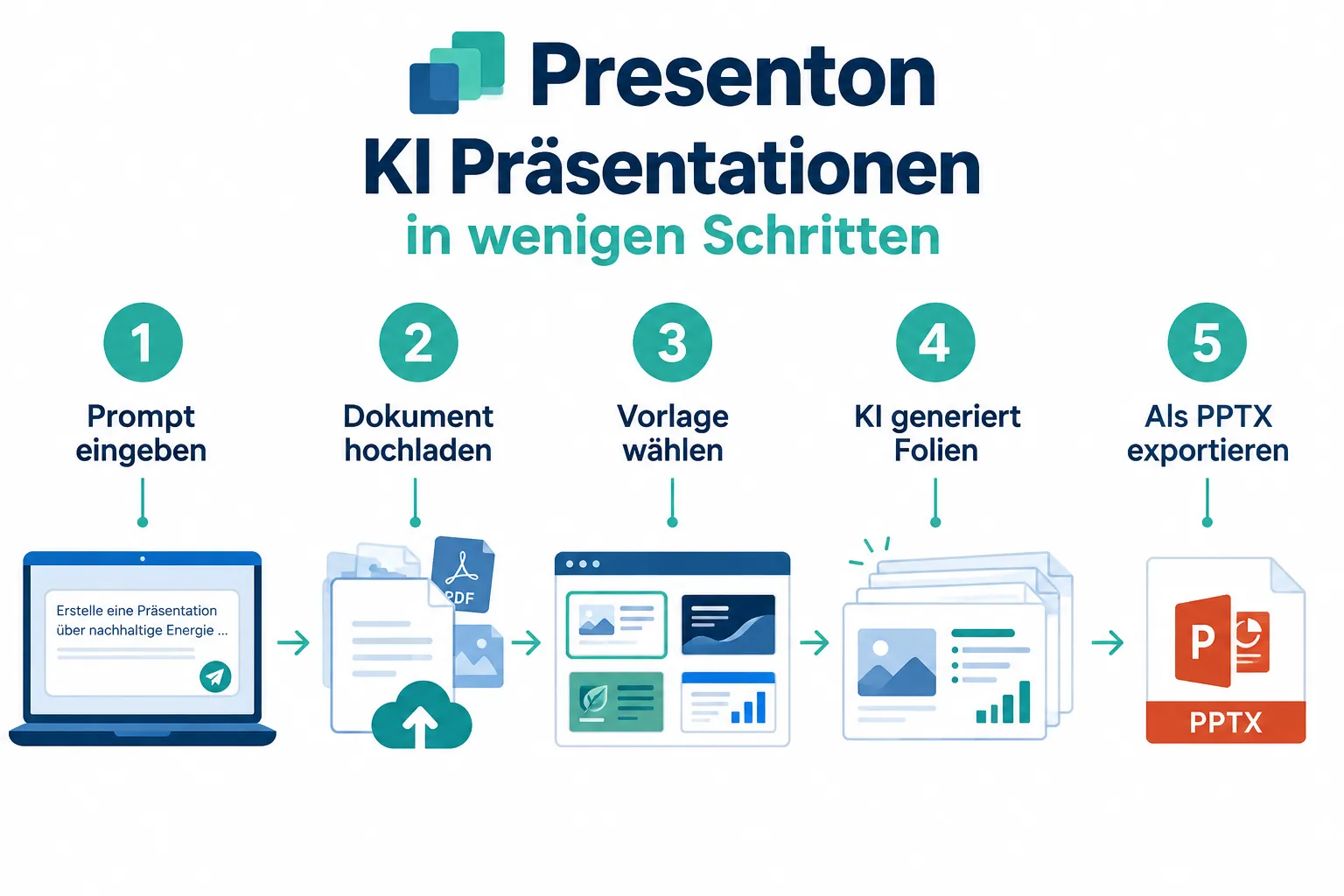
Officially, there are three operating modes: a managed cloud app, the self-hosted web server (including a one-command Docker setup), and native desktop applications for Windows, macOS, and Linux [2][12][19]. This flexibility is the central selling point of Presenton AI presentations: teams decide for themselves where their data lives and which language model generates the content.
Users provide a prompt, a topic, or a language, set the number of slides, and can additionally upload source material — such as PDFs, Word files, or data sheets — that feeds into the generated content as an “authoritative source” [4][5][9]. The result isn’t a rigid image gallery, but a fully editable presentation that can then be refined further in PowerPoint or LibreOffice.
Core Features of Presenton AI Presentations
Presenton bundles an unusually large feature list for an open-source project. The key building blocks at a glance:
- Multi-input generation: presentations from a free-form prompt, an uploaded document, or an existing PowerPoint design [5][9]
- BYOK model choice: OpenAI, Google Gemini, Vertex AI, Azure OpenAI, Anthropic Claude, Amazon Bedrock, Fireworks, Together AI, as well as local models via Ollama or LM Studio [10]
- Editable export: fully editable PPTX and PDF, no image screenshots of slides [3][5]
- Developer-friendly templates: layouts are built as TSX components with a Zod schema, enabling pixel-precise, on-brand designs [6]
- Image generation: choice between DALL-E 3, Gemini Flash, Pexels, or Pixabay for slide images
- Sign in with a ChatGPT account: no separate API key needed if you already have ChatGPT access
- Multi-user workspaces: admin panel for teams, an enterprise version with Helm charts for Kubernetes, SSO/OIDC/SCIM
The TSX/Zod-based template architecture in particular sets Presenton apart from classic SaaS tools: instead of pre-built, rigid templates, developers define their own layout rules in code, and the AI fills that structure with content [6]. For agencies that need to produce consistent, on-brand decks at scale, this is a real advantage over Gamma or Canva, where design adjustments are often only possible through the graphical interface.
Among the template presets are general, modern, standard, executive, momentum, and dynamic, each with its own visual character but the same underlying data structure. This makes it easy to switch content between designs without having to rewrite the generated text.
Installation and Self-Hosting
The self-hosting approach is at the core of Presenton’s promise. If you don’t want to use the cloud version, there are three practical paths:
| Deployment path | Target audience | Effort |
|---|---|---|
| Docker (one-command setup) | Developers, small teams | Low |
| Desktop app (.dmg/.exe/.deb) | Individual users, local use | Very low |
| Kubernetes/Helm (enterprise) | Companies, IT departments | Medium to high |
For quick tests, a single Docker command is enough to start the entire stack — backend, frontend, and database [2][12]. If you don’t want to run your own server, the repository offers ready-made deploy buttons for Railway and DigitalOcean, letting you spin up an instance on a third-party cloud in minutes, without Presenton itself ever seeing the data.
For users without an interest in servers, native desktop applications are also available for Mac, Windows, and Linux. These are especially suited for individuals or small agencies who don’t want to run persistent infrastructure but still want to work locally and offline [2][19].
Companies with higher compliance requirements rely on the enterprise variant with Helm charts for Kubernetes as well as SSO/OIDC/SCIM support, relevant for organizations that need centralized identity management and multi-user workspaces with an admin panel. This path is clearly aimed at IT departments running Presenton as an internal service, comparable to self-hosted tools like Nextcloud or GitLab.
Important for budgeting: the open-source and desktop versions are permanently free, with no subscription or usage limits. The only costs are token fees from whichever LLM provider you choose [1][17]. Anyone already running local models via Ollama can use Presenton completely without external API costs.
API and Integration for Presenton AI Presentations
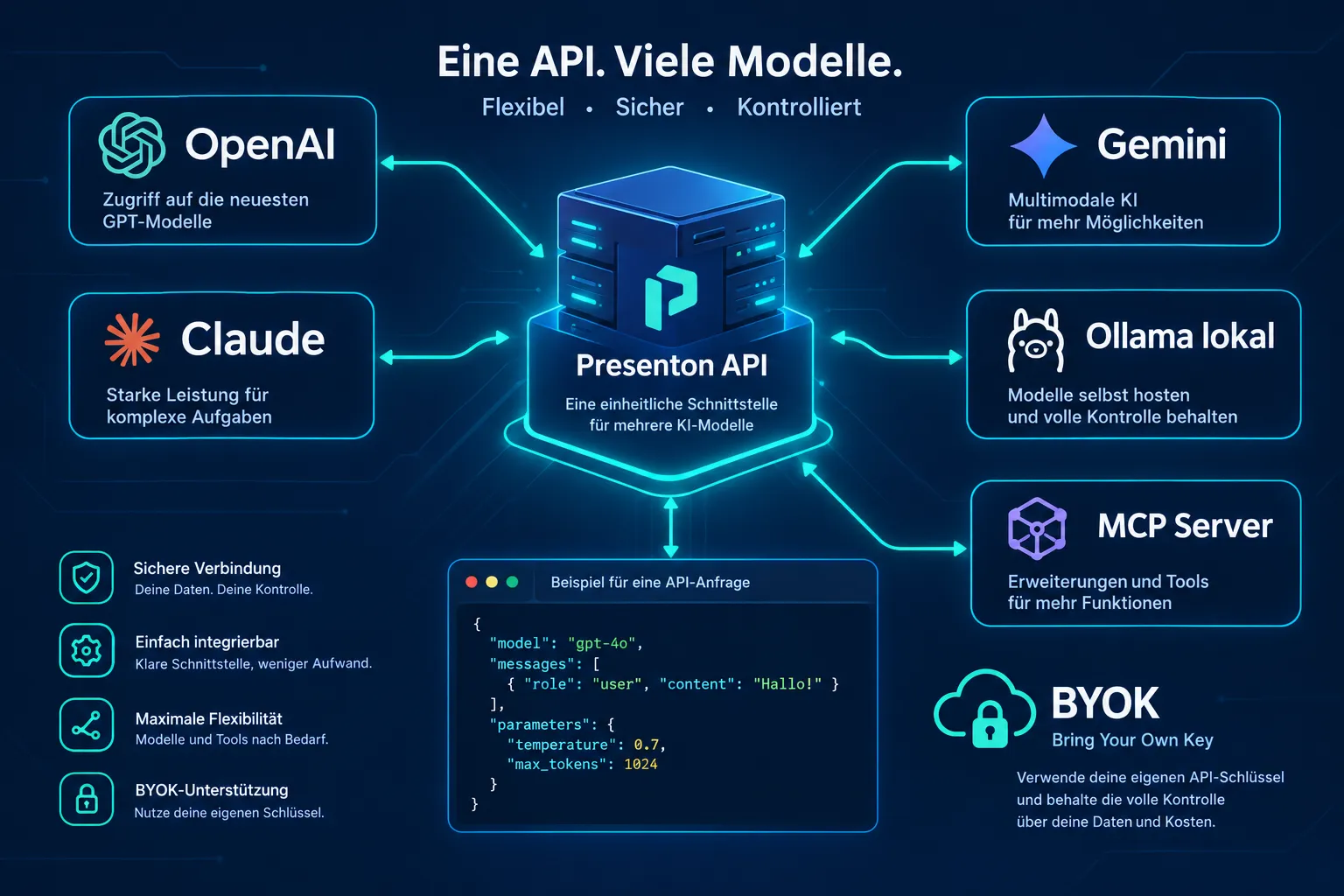
For developers, the REST API is the real reason to look into Presenton. The central endpoint POST /api/v1/ppt/presentation/generate accepts Markdown-formatted slide content along with additional instructions for layout control — for example, an instruction to render a particular section as a bar chart [2][3]. Authentication is handled via bearer token, which makes integration into existing CI/CD pipelines, internal tools, or reporting systems significantly easier.
“Presenton positions itself as the tool for teams that value control over convenience.”
Another highlight is the built-in MCP server (Model Context Protocol). This allows presentations to be generated directly from AI agent workflows, without building a separate API client [2][3]. For development teams already working with agent frameworks, this significantly reduces integration effort.
In practice, this means: an internal reporting system can automatically generate weekly customer reports as PPTX, a sales team can generate proposal decks from CRM data, or an agency can build its own frontend that talks to the Presenton API in the background. Tool directories rate this API and Docker integration accordingly positively, with user ratings around 4.1 out of 5 for the API and 4.0 out of 5 for Docker usage [3][22].
Who Is Presenton For
Presenton is not a replacement for a lightweight SaaS tool that generates a single presentation in three clicks. Its strength lies elsewhere:
- Developer teams who want to build presentation generation into their own products or internal tools
- Agencies and data teams that need automated, on-brand client reports at scale
- Companies with data privacy requirements that cannot send company data to external SaaS providers
- Users of local AI models who already run Ollama or LM Studio and don’t want additional cloud costs
- Individual users looking for a free, permanently usable desktop alternative to Canva or Gamma
Presenton is less suited for users who don’t want to do any technical setup at all. 2026 reviews rate the tool at around 7.2 out of 10 on average, praising brand consistency, self-hosting, and API integration, but criticizing the entry barrier and the — from a SaaS perspective — unusual pricing transparency: after all, you’re not paying Presenton, you’re paying your own LLM provider [16][22][24]. Still, in comparative overviews of self-hostable AI presentation tools, Presenton is regularly named a leading option whenever the requirement is “self-hosted, free, editable .pptx” [18][19][28].
Conclusion
Presenton AI presentations shows that open-source software in the field of AI-powered content creation has become serious competition for established SaaS providers. The combination of an Apache 2.0 license, genuine self-hosting, broad BYOK support, and a developer-friendly REST API with an MCP server makes the project one of the most compelling alternatives to Gamma, Canva, or Beautiful AI — at least for anyone who values control over data and infrastructure more than a perfectly polished click interface.
If your team has the technical chops, it’s worth trying Presenton directly: a Docker test deployment can be set up in a few minutes, or the desktop app is enough for a first impression without any server effort. After that, it’s worth taking a look at the API documentation to check whether Presenton can be integrated into existing reporting or agent workflows. The full repository, with installation instructions, Docker commands, and deploy buttons for Railway and DigitalOcean, is available on GitHub [2].
Frequently Asked Questions
nIs Presenton open source and can it be self-hosted?
nPresenton is open source under the Apache 2.0 license and can be fully self-hosted via Docker, a desktop app for Mac, Windows, or Linux, or an enterprise Kubernetes setup.
nWhich AI providers does Presenton support?
nThe tool supports virtually any AI provider in BYOK mode, including OpenAI, Google Gemini, Anthropic Claude, Azure OpenAI, Amazon Bedrock, as well as local models via Ollama.
nWhat export formats does Presenton offer?
nPresentations are created from prompts, uploaded documents, or your own PowerPoint templates, and can be exported as fully editable PPTX or PDF.
nIs Presenton free to use?
nThe open-source version is permanently free; the only costs are token fees from your chosen LLM provider.
nReferences
[1] presenton.ai – https://presenton.ai/ [2] Presenton – https://github.com/presenton/presenton [3] Presenton – https://github.com/presenton [4] Quickstart – https://docs.presenton.ai/cloud/quickstart [5] Overview – https://docs.presenton.ai/general/overview [6] Create Presentation Template With Ai – https://docs.presenton.ai/create-presentation-template-with-ai [7] Explore – https://presenton.ai/explore [8] Presenton Ai Presentation Generator 2026 – https://ai-heartland.com/tool/presenton-ai-presentation-generator-2026/ [9] Create New Presentation – https://docs.presenton.ai/user-guide/create-new-presentation [10] Presenton The Self Hosted Ai Presentation Revolution – https://www.blog.brightcoding.dev/2026/04/03/presenton-the-self-hosted-ai-presentation-revolution