A chatbot can explain how to fix a bug. An AI agent fixes it itself: it reads the source code, writes the fix, runs the tests, and reports back the result. This difference between talking and doing is the core of the AI agents vs chatbots debate, and it is changing how software is built, support is organized, and work is automated right now.
Many people still use the terms “chatbot” and “AI agent” interchangeably. That’s technically inaccurate and leads to the wrong expectations. This article explains step by step what makes a real AI agent, how the technology has evolved since 2022, and which real-world examples already exist today.
Table of Contents
Key Takeaways
- Chatbots are reactive: they respond once per message and have no independent access to tools or files.
- AI agents are autonomous: they plan multi-step tasks, use tools in a loop, and keep acting until a goal is reached.
- The development happened in three waves: simple chat models, code-autocomplete assistants, then fully autonomous agents.
- “Agentic Levels” distinguish between Level 0 (no agent) and Level 4+ (full autonomy with self-correction).
- Real-world examples like Claude Code, Devin, AutoGPT, and Hermes already show today how differently far agent autonomy can go.
AI Agents vs Chatbots: The Fundamental Difference
The difference between AI agents vs chatbots comes down to a single trait: the action loop. A classic chatbot follows a simple pattern: you ask a question, the model generates an answer, done. There’s no feedback, no verification, no second step. The chatbot doesn’t “know” whether its answer worked, because it doesn’t execute anything.
An AI agent, on the other hand, works in a loop often called the “agent loop” or “ReAct loop”: observe, think, act, observe again. The agent receives a goal, breaks it down into sub-steps, calls tools, such as code execution, a web search, or a file write, and then evaluates the result. If something’s wrong, it corrects itself and tries again. This continues until the goal is reached or a limit kicks in.
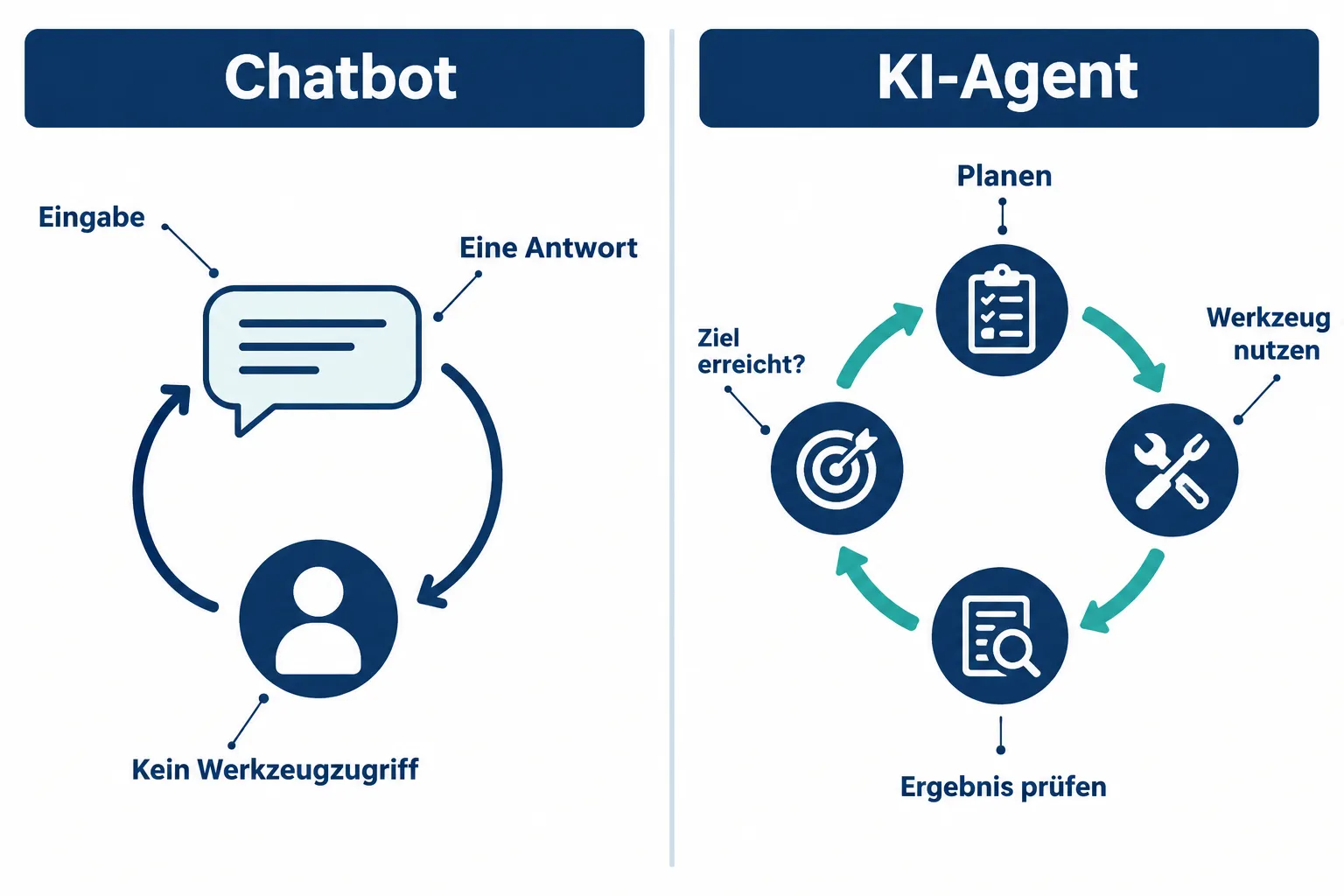
The table below summarizes the key differences:
| Trait | Chatbot | AI Agent |
|---|---|---|
| Flow | One request, one answer | Multi-step loop until goal is reached |
| Tool access | Usually none | Files, code execution, web, APIs |
| Planning | No independent planning | Breaks tasks into sub-steps |
| Self-correction | No | Yes, via feedback loops |
| Typical example | FAQ bot on websites | Claude Code, Devin |
“A chatbot answers a question. An agent completes a task.”
This short rule of thumb helps separate the two concepts in practice. Important: not every system marketed with “AI” is automatically an agent. Many products call themselves “agent” even though they’re technically just a chat interface with a bit more context.
The Evolution: From Chatbot to Autonomous AI Agent
The development from pure language models to real agents happened in clearly identifiable waves.
Wave 1, chat models (from 2022). With the public launch of ChatGPT in late 2022, generative AI became mainstream. These models could understand and formulate text but had no access to the outside world. They were purely reactive: input in, answer out.
Wave 2, code assistants with autocomplete. Tools like GitHub Copilot brought AI directly into the development environment. Copilot suggests lines of code as you type. That’s already more useful than a pure chatbot, but it remains fundamentally a suggestion system without its own ability to act. You still decide every single line yourself.
Wave 3, autonomous agents. Since around 2023/2024, systems emerged that can independently read and write files, execute code, research the web, and work through entire task packages. Projects like AutoGPT showed early on how a model can set its own intermediate goals. Later, more mature systems like Claude Code, Devin, or Hermes went a step further: they work in real development environments, understand project structures, and deliver verifiable results instead of just text suggestions.
This evolution shows why the distinction between AI agents vs chatbots matters so much today. It’s not a new marketing label, it’s a real architectural shift: from “generate text” to “complete tasks”.
Agent Classes: Single-Agent, Multi-Agent Swarms and Orchestrator Patterns
Not every agent is built the same way. In practice, several architecture patterns have become established that you should know if you want to evaluate or build agent systems yourself.
Single-agent systems. A single model handles planning, tool use, and execution entirely on its own. This is the simplest form and works well for clearly defined tasks, such as “read this file and summarize the errors”.
Multi-agent swarms. Here, several specialized agents work in parallel or in sequence on a bigger problem. One agent might be responsible exclusively for research, another for code review, a third for writing tests. The advantage: each agent can be specialized for its sub-task and equipped with the right tools.
Orchestrator-worker patterns. This architecture combines both approaches. A higher-level “orchestrator” agent plans the overall task, distributes sub-tasks to specialized “worker” agents, and merges the results at the end. This resembles a project manager delegating tasks to a team instead of doing everything themselves. Many modern development tools use exactly this pattern because it keeps complexity manageable and makes errors in individual sub-steps easier to isolate.
For beginners, it’s important to understand: the more complex the architecture, the more coordination overhead there is, but the more powerful the system becomes for large, branching tasks.
The Agentic Levels: From Level 0 to Full Autonomy
To make agent systems comparable, the industry has established a tiered model, often called “Agentic Levels”. It describes how much autonomy a system actually has.
- Level 0, no agent. Static rules or simple scripts without AI decisions.
- Level 1, simple chat response. The model responds to an input without tools or memory across multiple steps.
- Level 2, single tool call. The model may use one tool, such as a search or a calculation, but then delivers the final answer directly.
- Level 3, multi-step planning. The system breaks a task into several steps, calls different tools in sequence, and links the results together.
- Level 4+, full autonomy. The system plans independently, selects appropriate tools, checks its own intermediate results, and corrects itself until the goal is reached, often over minutes or hours, without every step needing manual confirmation.
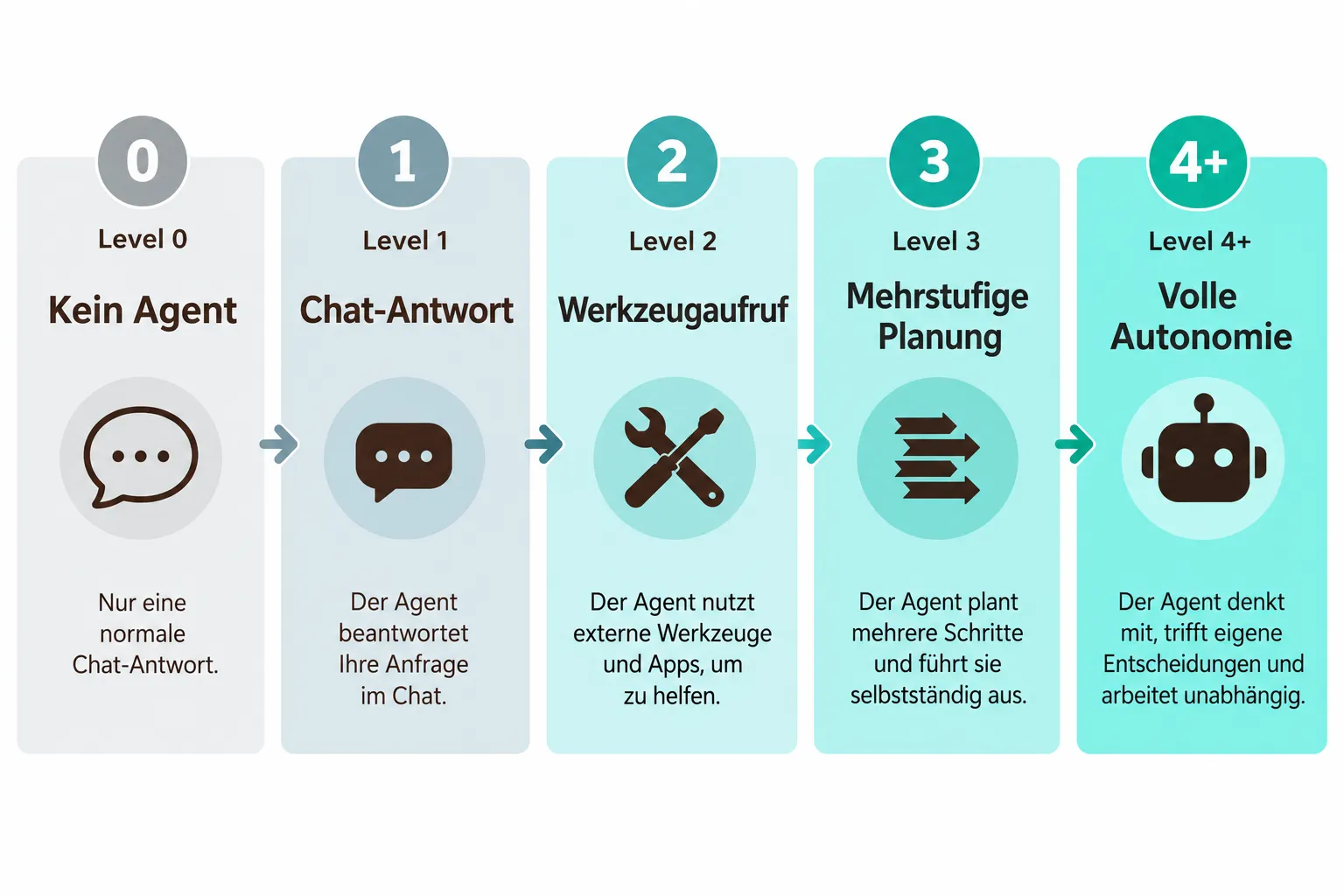
This model helps you critically evaluate marketing promises. A tool that calls itself an “AI agent” but only operates at Level 1 or 2 is functionally barely distinguishable from a classic chatbot. Real autonomy starts at Level 3, and full self-direction at Level 4.
Real-World Examples of AI Agents vs Chatbots in Practice
To make the difference tangible, it’s worth looking at concrete systems in use today:
| Tool | Category | Short Description |
|---|---|---|
| ChatGPT (2022) | Chatbot | Pure conversational model with no default access to files or code execution |
| GitHub Copilot | Code assistant | Autocomplete suggestions directly in the editor, no independent execution |
| AutoGPT | Early autonomous agent | Sets its own intermediate goals, early pioneer for agent loops |
| Devin | Autonomous developer agent | Handles programming tasks independently across multiple steps |
| Claude Code | Autonomous coding agent | Reads and writes files, executes code, works in real project environments |
| Hermes | Autonomous agent | Uses tools in a loop to handle complex tasks |
| GitHub Copilot Workspace | Orchestrated agent | Plans changes across multiple files before code is written |
This overview clearly shows: the further right in the timeline, the more independence. While ChatGPT in 2022 only ever reacted, systems like Claude Code or Devin today plan entire workflows and actively intervene in file systems or development environments.
When Do You Need a Chatbot and When an AI Agent?
Not every task requires a fully autonomous agent. The choice depends on the complexity and risk of the task.
A chatbot is enough when:
- you need a quick answer to a single question
- no files or systems need to be changed
- human control at every step is desired
An AI agent is worth it when:
- a task requires multiple steps and tools
- routine work should be automated, such as code refactoring or research
- intermediate results need to be checked and corrected before the final result counts
IT decision-makers should also keep in mind: more autonomy also means more responsibility for oversight. An agent that independently modifies files or executes code needs clear guardrails, logging, and approval processes.
Conclusion
The distinction between AI agents vs chatbots is more than a matter of terminology, it describes two fundamentally different technologies. Chatbots react, agents act. Chatbots answer, agents complete. This shift from reactive conversation to autonomous task handling is the most important development in applied AI over recent years.
For you as a beginner, developer, or decision-maker, this means: for every tool calling itself an “agent”, check specifically which Agentic Level it actually operates at and whether it truly uses tools in a loop, or whether at its core it’s still a chatbot with a new name. This check saves you from wrong expectations and helps with choosing the right tool.
This is part 1 of our series Getting Started with AI Agents. Part 2 covers MCP, Memory, Skills and Hooks; Part 3 compares concrete agent tools like Hermes and Claude Code.