A single missing index can slow a query from 2 milliseconds to 8 seconds, with identical data volume, identical hardware, identical code. That’s exactly where many backend developers with basic MySQL knowledge hit an invisible wall: the application runs buttery-smooth in testing, but under production load, database performance collapses. If you already know the basics of PHP, Node.js, and MySQL, you’re now ready for the next step: understanding why indexes work, how to dissect them with EXPLAIN, and where classic performance traps lurk.
This article goes beyond simple “just add an index” tips. It covers the B-tree mechanics behind indexes, the cost-benefit tradeoff on writes, concrete EXPLAIN analyses, and the traps that even experienced teams regularly get slowed down by in production.
Table of Contents
Key Takeaways
- Indexes are built on B-tree structures and speed up reads, but measurably slow down every INSERT, UPDATE, and DELETE.
- High cardinality (many distinct values) makes indexes valuable; low cardinality (e.g., boolean columns) often makes them useless or even counterproductive.
- EXPLAIN and EXPLAIN ANALYZE show exactly whether MySQL uses an index, performs a full table scan, or sorts expensively.
- The N+1 problem, missing JOIN indexes, and SELECT * are the three most common performance killers in ORM-based applications.
- Connection pooling and multi-tier caching (Redis, application-level) take load off the database before a query even arrives.
How Indexes Actually Work: The B-Tree Structure in Detail
A MySQL index is, at its core, a sorted B-tree. Instead of scanning every row of a table sequentially, the database navigates through multiple levels of nodes — root node, branch nodes, and leaf nodes — reducing search complexity from O(n) to O(log n).
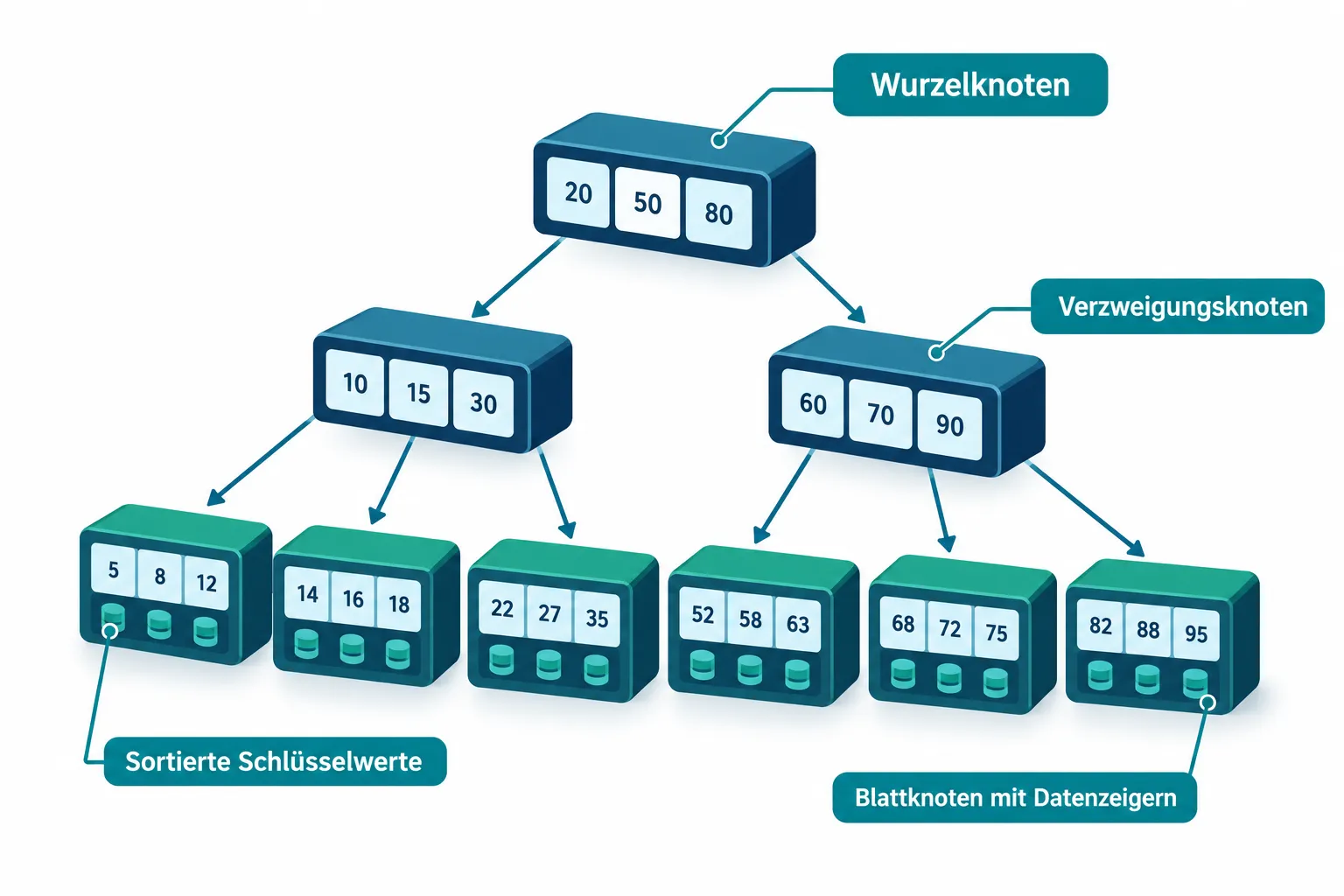
With InnoDB, the default storage engine, the primary key index is also the clustered index: the actual data rows are physically stored sorted by the primary key. Secondary indexes, on the other hand, store only the index value plus a reference to the primary key in their leaf nodes. This means: if a query uses a secondary index but needs additional columns, a second lookup into the clustered index follows — a so-called “bookmark lookup”.
This is exactly where the concept of a covering index comes in: an index that already contains all columns needed in SELECT, WHERE, and ORDER BY makes this second lookup unnecessary. The MySQL reference manual explicitly recommends, for advanced tuning, checking index selectivity and coverage rather than reflexively adding more indexes [1][2].
-- Covering index for a frequent filter query
CREATE INDEX idx_orders_covering
  ON orders (customer_id, status, created_at, total_amount);
When Indexes Help Database Performance, and When They Hurt
Not every column benefits from an index. The decisive metric is cardinality — the number of distinct values relative to the row count.
| Scenario | Index worthwhile? | Reasoning |
|---|---|---|
| Email address (high cardinality) | Yes | Almost every value is unique, high selectivity |
| Status column with 3 values (low cardinality) | Rarely | Optimizer often scans anyway, index brings little benefit |
| Table with under 1,000 rows | Usually no | Full table scan is often faster than an index lookup |
| Column with very heavy writes (e.g., log timestamp under high write load) | Trade-off | Every write has to rebalance the B-tree |
| JOIN columns (foreign keys) | Yes, almost always | Without an index, an expensive nested scan results |
The “writes” point is often underestimated: every additional index has to be maintained on every INSERT, UPDATE, and DELETE. On a table with ten secondary indexes, a single INSERT suddenly costs ten additional B-tree updates. On write-heavy systems, such as event logging or IoT data streams, this can turn database performance optimization into its opposite.
Another pitfall: functions on indexed columns prevent index usage entirely. WHERE YEAR(created_at) = 2026 can’t use the index on created_at, because MySQL has to evaluate the function for every row before a comparison is even possible [5]. The solution is a range comparison:
-- Bad: prevents index usage
SELECT * FROM orders WHERE YEAR(created_at) = 2026;

-- Good: uses the index on created_at
SELECT * FROM orders
WHERE created_at >= '2026-01-01' AND created_at < '2027-01-01';
Since MySQL 8.4, the optimizer also supports automatic histogram updates, which significantly improve cardinality estimation for complex queries with multiple possible index paths [4]. Outdated statistics can be manually recalculated with ANALYZE TABLE table_name; — an important step when EXPLAIN returns row estimates that deviate significantly from reality. On the application side, it’s also worth checking recent backend developments, such as our article on PHP 8.5 and Laravel 2026, which covers new concurrency tools for database-heavy applications.
EXPLAIN and Query Analysis in MySQL: The Roadmap to Database Performance
EXPLAIN is the most important tool for any serious database performance work. It shows how MySQL actually executes a query — access method, index used, estimated row count, and possible extra operations [12][14].
EXPLAIN SELECT o.id, o.total_amount, c.name
FROM orders o
JOIN customers c ON c.id = o.customer_id
WHERE o.status = 'shipped'
ORDER BY o.created_at DESC
LIMIT 20;
Important columns in the output:
- type:
ALLmeans full table scan (bad),rangeorrefmean index usage,eq_refandconstare ideal. - rows: estimated number of rows examined — the lower, the better.
- Extra: hints like “Using filesort” (missing sort index) or “Using temporary” (missing GROUP BY index).
Since MySQL 8.0.18, EXPLAIN ANALYZE additionally provides real execution times instead of pure estimates — a crucial difference when statistics are outdated [9][13][14]:
EXPLAIN ANALYZE SELECT o.id FROM orders o WHERE o.customer_id = 4821;
Practical checklist based on typical EXPLAIN signals [8][14]:
type = ALLon WHERE or JOIN columns → missing index.Extra: Using filesort→ add the ORDER BY column to the index.Extra: Using temporary→ index the GROUP BY column.- Large gap between estimated and actual rows → run
ANALYZE TABLE.
Multi-column indexes should be designed deliberately: equality predicates first, then range or sort columns, optionally followed by pure SELECT columns for a covering index [8][9][13][14]. A correctly built index can also reduce the number of expensive file sorts, as recent optimizer improvements around reverse index range scans also show [3].
-- Multi-column index matching the query above
CREATE INDEX idx_orders_status_created
  ON orders (status, created_at, customer_id);
Index hints like FORCE INDEX or IGNORE INDEX are occasionally helpful, but should be re-evaluated after every MySQL upgrade, since the optimizer keeps improving and old hints can become counterproductive [7]. For OR conditions across multiple indexes, switchable optimizations let you specifically test whether index merge improves runtime [10].
Common Performance Traps in Practice
The N+1 Problem
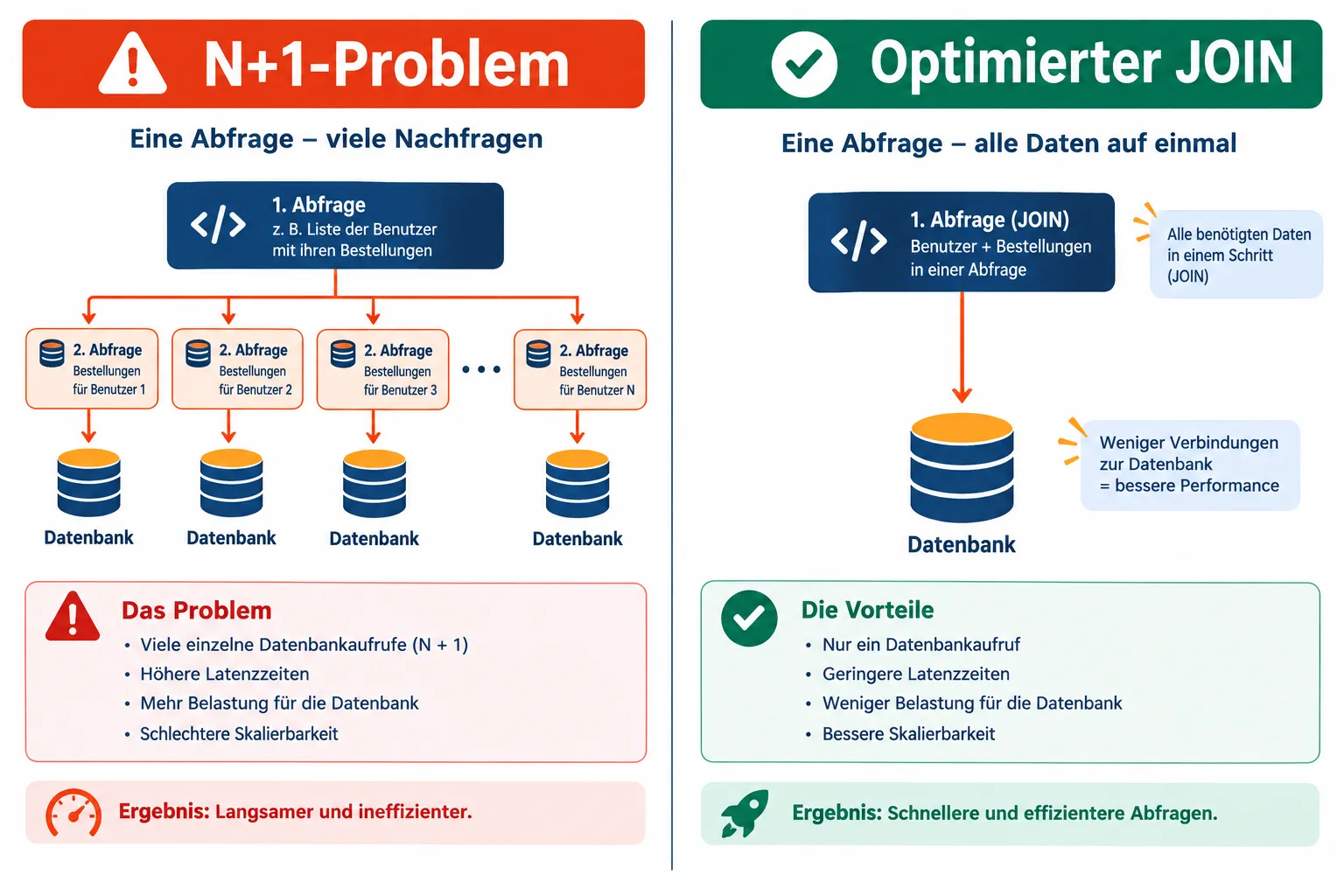
The N+1 problem usually creeps in unnoticed via ORMs. An example with a typical Node.js ORM:
// N+1 problem: 1 query for orders + N queries for each customer
const orders = await Order.findAll();
for (const order of orders) {
  const customer = await Customer.findByPk(order.customerId); // runs N times!
}
With 500 orders, this results in 501 separate database calls instead of a single JOIN. The solution is eager loading:
// A single query with JOIN instead of 501 individual queries
const orders = await Order.findAll({
  include: [{ model: Customer, attributes: ['id', 'name'] }]
});
Missing Indexes on JOINs
JOIN columns without an index force MySQL into nested scans across both tables. Foreign key columns should therefore almost always be indexed:
CREATE INDEX idx_orders_customer_id ON orders (customer_id);
Avoiding SELECT *
SELECT * often loads unnecessary columns, prevents covering indexes, and increases network load and memory usage. Explicit column lists are the standard for clean query tuning:
-- Instead of SELECT * FROM orders WHERE customer_id = 4821;
SELECT id, status, total_amount, created_at
FROM orders
WHERE customer_id = 4821;
Paging is also worth rethinking: OFFSET-based paging (LIMIT 20 OFFSET 10000) becomes increasingly slow on large tables, because MySQL still has to read all the skipped rows. Keyset pagination over an indexed ID or timestamp column is significantly more efficient [8][14]:
-- Keyset pagination instead of OFFSET
SELECT id, status, created_at
FROM orders
WHERE created_at < '2026-06-01 12:00:00'
ORDER BY created_at DESC
LIMIT 20;
Connection Pooling: Concept and Best Practices
Every new database connection costs a TCP handshake, authentication, and memory setup — typically several milliseconds. At high request frequency, this quickly adds up to noticeable latency. Connection pooling solves this by reusing a limited number of open connections instead of opening a new one for every request.
Best practices for connection pooling:
- Limit pool size: Pools that are too large overload the database server; pools that are too small create wait times. A good starting value is often the number of CPU cores times 2 to 4.
- Configure timeouts: Idle connections should be closed after a defined time to avoid resource leaks.
- Enable health checks: The pool should automatically detect and replace dead connections.
- One pool per application instance: Multiple instances with their own pools prevent one overloaded instance from blocking the others.
// Example: MySQL2 connection pool in Node.js
const pool = mysql.createPool({
  host: 'localhost',
  user: 'app_user',
  connectionLimit: 20,
  idleTimeout: 60000
});
Caching Strategies for Sustainable Database Performance
The best query is the one that never reaches the database. Caching at multiple layers reduces load sustainably:
| Caching layer | Use case | Typical TTL |
|---|---|---|
| Redis (key-value) | Frequently read, rarely changed data (e.g., product catalogs) | Seconds to hours |
| Application-level cache | Computed results, session data in process memory | Milliseconds to minutes |
| Query result cache (external) | Complete query results for identical parameters | Minutes to hours |
A typical pattern combines Redis with a cache-aside approach:
async function getCustomer(id) {
  const cached = await redis.get(`customer:${id}`);
  if (cached) return JSON.parse(cached);

  const customer = await db.query(
    'SELECT id, name, email FROM customers WHERE id = ?', [id]
  );
  await redis.set(`customer:${id}`, JSON.stringify(customer), 'EX', 300);
  return customer;
}
A clear invalidation strategy is essential: whenever the underlying data is UPDATEd or DELETEd, the corresponding cache entry must be explicitly removed, otherwise stale responses will occur.
Conclusion and Next Steps
Sustainable database performance optimization doesn’t come from blanket rules, but from systematic measurement. B-tree indexes significantly speed up selective reads, but cost on every write. EXPLAIN and EXPLAIN ANALYZE provide the objective basis for evaluating index usage, join order, and sort operations instead of relying on gut feeling. Classics like the N+1 problem, missing JOIN indexes, and SELECT * can be fixed with the patterns shown here.
As a concrete next step: check your application’s three slowest queries with EXPLAIN ANALYZE, identify unused indexes via sys views like sys.schema_unused_indexes, and then introduce connection pooling and a Redis caching layer wherever reads dominate. Combining these three levers consistently often cuts response times by an order of magnitude without adding a single server.
References
[1] Optimization Indexes – https://dev.mysql.com/doc/refman/8.4/en/optimization-indexes.html [2] Optimization – https://dev.mysql.com/doc/refman/8.4/en/optimization.html [3] News 8 4 11 – https://dev.mysql.com/doc/relnotes/mysql/8.4/en/news-8-4-11.html [4] Mysql 8.4 Relnotes En – https://downloads.mysql.com/docs/mysql-8.4-relnotes-en.pdf [5] Where Optimization – https://dev.mysql.com/doc/refman/8.4/en/where-optimization.html [7] Introduction To Mysql Query Tuning For Devops – https://downloads.mysql.com/events/mysql-global-forum/Introduction_to_MySQL_Query_Tuning_for_Devops.pdf [8] Database Mysql Explain Query Optimization – https://pkglog.com/en/blog/database-mysql-explain-query-optimization/ [9] How To Query Tune In Mysql – https://www.getgalaxy.io/learn/glossary/how-to-query-tune-in-mysql [10] Switchable Optimizations – https://dev.mysql.com/doc/refman/8.4/en/switchable-optimizations.html [12] Optimizing Queries with EXPLAIN – https://dev.mysql.com/doc/refman/8.4/en/using-explain.html [13] How To Query Tune In Mysql – https://www.getgalaxy.io/learn/glossary/how-to-query-tune-in-mysql [14] Database Mysql Explain Query Optimization – https://pkglog.com/en/blog/database-mysql-explain-query-optimization/
Frequently Asked Questions
Why can a single missing index drastically slow down a query?
Without an index MySQL has to scan every row sequentially (O(n)), while a B-tree index reduces that to O(log n) — the difference between a 2-millisecond query and one that takes 8 seconds.
When does adding another index do more harm than good?
On low-cardinality columns (e.g. booleans), tables under 1,000 rows, or heavily write-loaded tables, since every INSERT, UPDATE, and DELETE has to maintain each additional index.
What is EXPLAIN used for in MySQL?
EXPLAIN shows whether a query uses an index, performs a full table scan, or sorts expensively; EXPLAIN ANALYZE goes further and reports real execution times instead of estimates.
What is the N+1 problem and how do you fix it?
It happens when an ORM issues one extra query per row of a result set instead of a single JOIN; the fix is eager loading, which pulls all the needed data in one query.