An AI assistant that doesn’t just suggest code, but moves the mouse, opens windows, and executes clicks itself, that stopped being a future vision on October 1, 2026, when it became a public preview feature in GitHub Copilot. With GitHub Copilot Computer Use, the assistant leaves the terminal and editor context behind for the first time and interacts directly with graphical desktop applications.
For developers and IT teams, this is a notable step: Copilot evolves from a code helper into an agent that can take over entire on-screen workflows. This article explains what GitHub Copilot Computer Use actually does, how activation works, which permissions are required, and how it compares to competing approaches from OpenAI and Anthropic.
Table of Contents
Key Takeaways
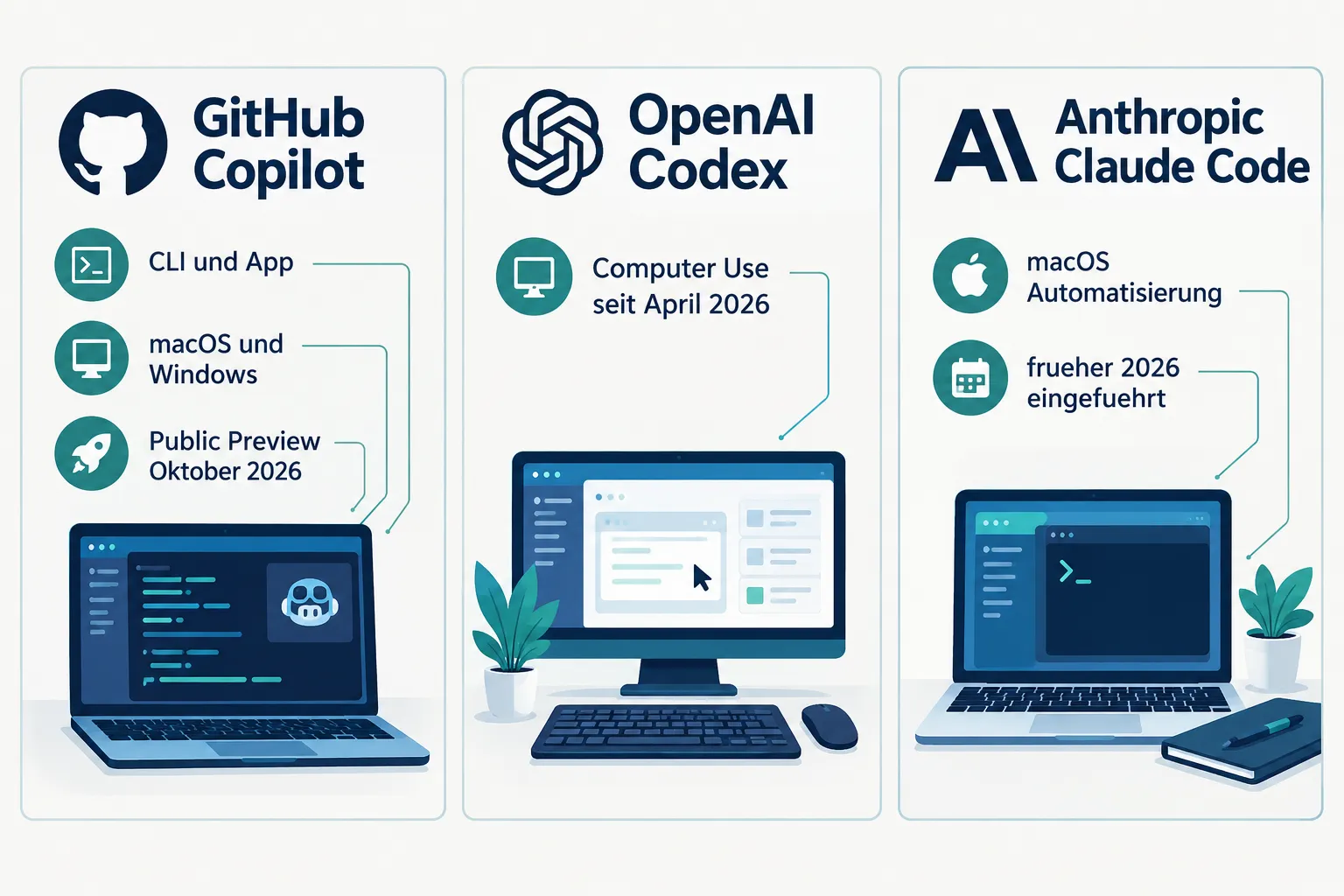
- GitHub released Computer Use for Copilot on October 1, 2026 in public preview, available in the Copilot CLI and in the Copilot apps for macOS and Windows.
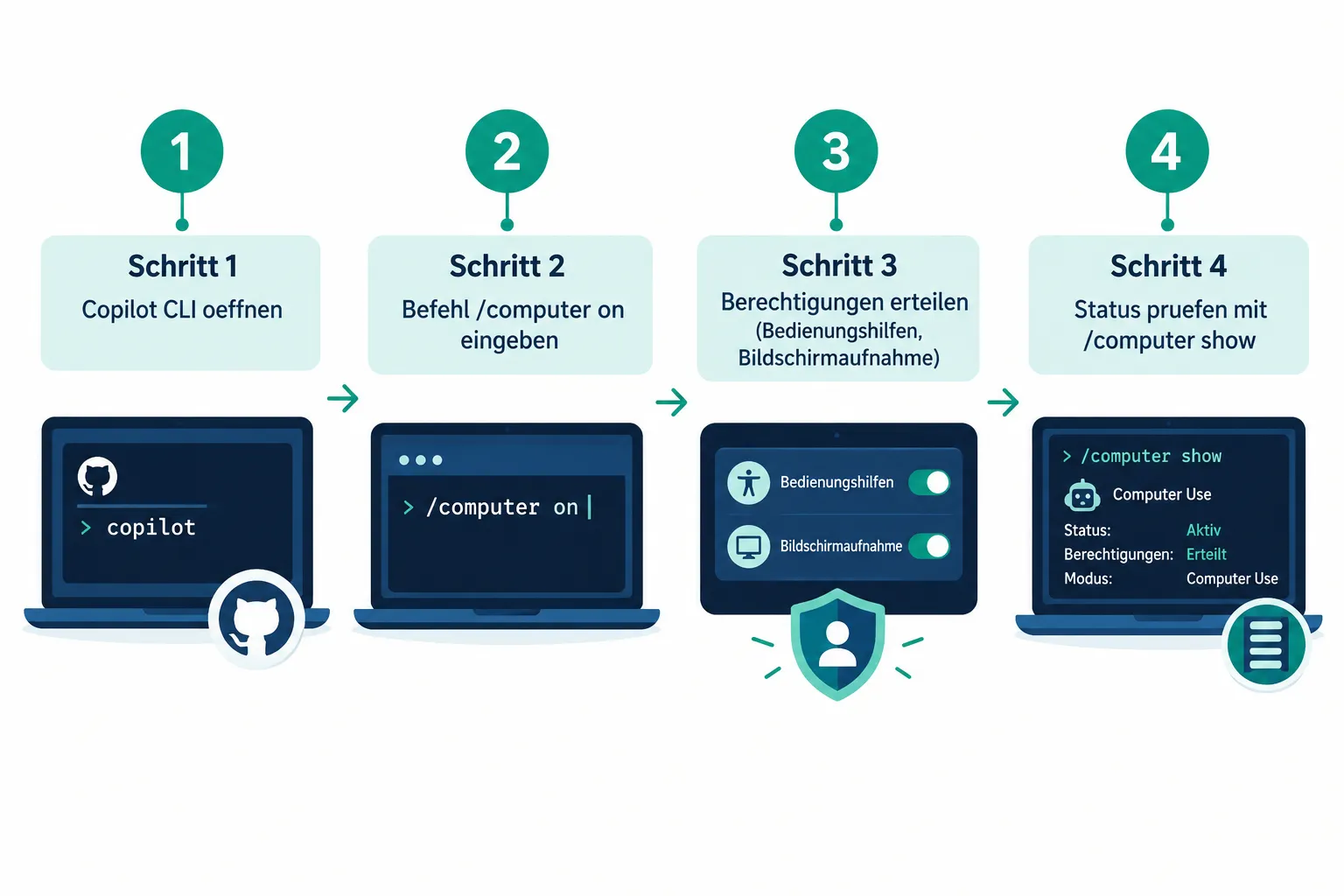
- Activation happens via the CLI command
/computer on, status check with/computer show, and disabling with/computer off. - On macOS, Copilot walks users through granting Accessibility and Screen Recording permissions required for visual control.
- The feature fits a broader market trend: OpenAI added Computer Use to Codex in April 2026, while Anthropic had already brought comparable capabilities for macOS to Claude Code and Claude Cowork earlier in 2026.
- GitHub itself recommends trying direct APIs or CLI tools first and treating GUI automation only as a fallback, a clear signal of the feature’s experimental character.
What Is GitHub Copilot Computer Use
GitHub Copilot Computer Use is a new capability that lets Copilot directly operate desktop applications, not just write code or run terminal commands. According to the official GitHub changelog and accompanying reporting from thenewstack.io, the feature launched in public preview on October 1, 2026.
In practice, this means Copilot can execute mouse clicks, enter text, switch between application windows, and capture visual context from the screen on the user’s behalf. Instead of merely proposing code changes, the assistant acts like a user sitting in front of the machine, including interacting with interfaces for which no API or command-line tool exists.
The feature is currently available in two environments: the GitHub Copilot CLI and the GitHub Copilot app for macOS and Windows. That covers both developers who primarily work from the command line and those who prefer a native desktop application.
How to Activate GitHub Copilot Computer Use
Control happens through simple slash commands in the Copilot CLI:
| Command | Function |
|---|---|
/computer on |
Enables Computer Use for the current session |
/computer show |
Shows the current status of the feature |
/computer off |
Disables Computer Use again |
This command structure is intentionally minimal: developers don’t need to install additional software, but can switch the feature on and off for the duration of a specific task. That provides clear control over when Copilot actually has access to the desktop and when it doesn’t.
The Permissions GitHub Copilot Computer Use Needs on macOS
For Copilot to interact with desktop applications at all, the operating system needs to grant access to certain system functions. On macOS, GitHub Copilot Computer Use actively guides users through setting up two permissions:
- Accessibility: This permission lets Copilot trigger mouse movements, clicks, and keyboard input in other applications.
- Screen Recording: This permission provides the visual context Copilot needs to recognize what’s currently happening on screen, such as which windows are open or where a button is located.
Without both of these grants, the feature can’t work meaningfully, since it needs to both “see” and “act” to control a desktop application. According to GitHub, the guided permission process is designed to ensure users consciously consent before Copilot receives these far-reaching system privileges.
Windows users face equivalent requirements as well, even though the permission mechanism follows that operating system’s own conventions. In every case, the principle is the same: enabling Computer Use grants an AI agent direct insight into, and control over, applications running on your own machine.
“Copilot can interact with desktop applications on your behalf, not just with code or the terminal.”
Market Context: Computer Use at GitHub, OpenAI, and Anthropic
GitHub Copilot Computer Use isn’t an entirely new idea, it fits into a development that has been underway among competing AI coding tools for months. According to thenewstack.io, OpenAI added a comparable Computer Use capability to Codex in April 2026. Anthropic was even earlier to this trend: the company had already integrated broader Computer Use support for macOS into Claude Code and Claude Cowork earlier in 2026.
With its October 2026 release, GitHub is essentially catching up rather than leading the trend. That context matters for developers because it shows that GUI control by AI agents is becoming a standard building block across the industry’s coding assistants, regardless of whether a team primarily works with GitHub Copilot, OpenAI Codex, or Anthropic’s Claude products.
One difference lies in the framing GitHub itself applies. According to thenewstack.io’s reporting, GitHub explicitly recommends trying other approaches first, such as direct APIs or existing CLI tools, before resorting to desktop GUI automation. That suggests GitHub views Computer Use more as a fallback solution for situations where no clean programmatic interface exists, rather than as a preferred default path.
What GitHub Copilot Computer Use Means for Developer Workflows
For developers working with PHP, Node.js, or other web technologies, Computer Use opens up new practical possibilities, but it also carries risks that should be considered before adoption.
Opportunities
- Automating GUI-only workflows: Many development tools, internal admin panels, or legacy desktop software offer no API. Computer Use makes it possible to bring such tools into automated pipelines anyway.
- Fewer context switches: Instead of manually jumping between terminal, browser, and desktop applications, Copilot can take over parts of a task directly on screen.
- Broader testing scenarios: Visual interaction can help verify behavior that isn’t easily captured by unit tests or API calls alone, such as how a native application actually behaves.
- A unified agent approach: Teams already using Copilot don’t need to introduce a separate automation tool just to handle simple desktop interactions.
Risks and Security Considerations
GUI automation by AI agents raises real security questions that developers and IT leaders should take seriously:
- Far-reaching system permissions: Accessibility and Screen Recording access are powerful rights. Granting them to an agent effectively allows insight into everything visible on screen, including sensitive data in other applications.
- Error potential in visual control: Unlike a defined API, a GUI can change, move elements around, or behave unexpectedly. An AI agent can therefore make mis-clicks whose consequences are harder to predict than a failed API call.
- Experimental status: The feature is in public preview. GitHub’s own advice to use GUI automation only as a last resort underscores that the technology isn’t yet considered a mature default path.
- Control and traceability: When an agent automates clicks and input, it becomes more important to have logs and session boundaries so you can reconstruct which actions actually took place.
Teams are therefore well advised to take a cautious, incremental approach: test Computer Use first in non-critical, well-understood scenarios, deliberately bound sessions with /computer on and /computer off, and for sensitive environments, continue to rely on established API- or CLI-based automation for now.
Side Note: Other Recent Copilot Developments
The release of Computer Use falls into a period of intense development for GitHub Copilot. Just one day later, on October 2, 2026, GitHub also expanded its code review capabilities: API support for Copilot code review was added, and “Balanced” has been the new default effort level since September 28, 2026. These changes aren’t directly related to Computer Use, but they illustrate the pace at which GitHub is currently expanding Copilot, from code analysis to desktop control.
If you’re interested in the broader automation of coding agents beyond simple terminal commands, our article Herdr: The Runtime That Keeps Your Coding Agents Working After You Close the Laptop covers related background.
Conclusion and Next Steps
GitHub Copilot Computer Use marks a clear step away from a pure code assistant toward an agent that can take over entire desktop workflows. The feature has been available in public preview since October 1, 2026, is controlled simply through the Copilot CLI with /computer on, /computer show, and /computer off, and requires deliberately granting Accessibility and Screen Recording permissions on macOS.
In the broader market, GitHub is responding to similar moves by OpenAI with Codex and Anthropic with Claude Code and Claude Cowork, Computer Use capabilities are becoming an industry-wide trend. At the same time, GitHub’s own advice to treat GUI automation as a fallback makes clear the technology still has an experimental character.
For developers and IT teams, a pragmatic approach pays off: try the feature in a test environment, grant permissions deliberately, keep sessions clearly bounded, and continue to rely on proven APIs or CLI tools for critical tasks. With that caution in mind, GitHub Copilot Computer Use can be used specifically where no better automation option previously existed.