A developer types a command into the terminal, and ten minutes later a pull request is ready, tested, and documented. Someone else sends a message to a Telegram bot in the evening and gets a sorted summary of their emails the next morning. Both are AI agents in action, but they are completely different tools for completely different tasks. This is exactly where the confusion that makes this AI agent tools comparison necessary begins: names like Claude Code, Hermes, Copilot Agent Mode, or Devin sound interchangeable, but they solve fundamentally different problems.
This is part 3 (final) of our series “Getting Started with AI Agents”. Part 1 explains the difference between chatbots and agents, part 2 covers MCP, Memory, Skills and Hooks. This final part is about the concrete tool choice: which agent fits your daily routine, your project, or your team.
Table of Contents
Key Takeaways
- Claude Code is a terminal-based coding agent that works directly in the project directory, ideal for developers with a codebase focus.
- Hermes runs as its own host and integrates messaging services like Telegram as well as MCP servers, suited for everyday automation.
- GitHub Copilot Agent Mode is deeply integrated into the IDE and targets teams who want to stay in their existing developer workflow.
- Devin positions itself as a more autonomous agent for complete tickets, typically running in cloud sandboxes.
- AutoGPT remains important as an early pioneer, but also shows the limits of uncontrolled autonomy.
- The hosting decision, local, cloud VPS, Docker sandbox, or SaaS, affects security, cost, and control just as much as the tool choice itself.
The Most Important AI Agents at a Glance
Before an AI agent tools comparison makes sense, the categories need to be sorted out. Broadly, the tools discussed here fall into three groups: coding agents that work directly on code; personal assistant agents that handle everyday tasks via messaging channels; and autonomous task agents meant to independently work through larger assignments.
Claude Code from Anthropic belongs to the first group. It’s a CLI tool that runs in the terminal and accesses the project directory directly. Developers phrase tasks in natural language, the agent reads files, writes code, runs tests, and proposes commits. GitHub Copilot with Agent Mode or Copilot Workspace pursues a similar goal but is firmly embedded in the IDE (such as VS Code) rather than living in the terminal.
Hermes belongs to the second group: a personal AI agent assistant that runs as its own host and can be operated via messaging services like Telegram. Through MCP server support, Hermes can access external tools and data sources, comparable to what part 2 of this series explained about MCP.
Devin, developed by Cognition, targets more autonomous software tasks: complete tickets, not just individual code snippets. AutoGPT, finally, was one of the first open-source agents in 2023 to show how a language model can set its own intermediate steps, today relevant mainly as a historical reference point.
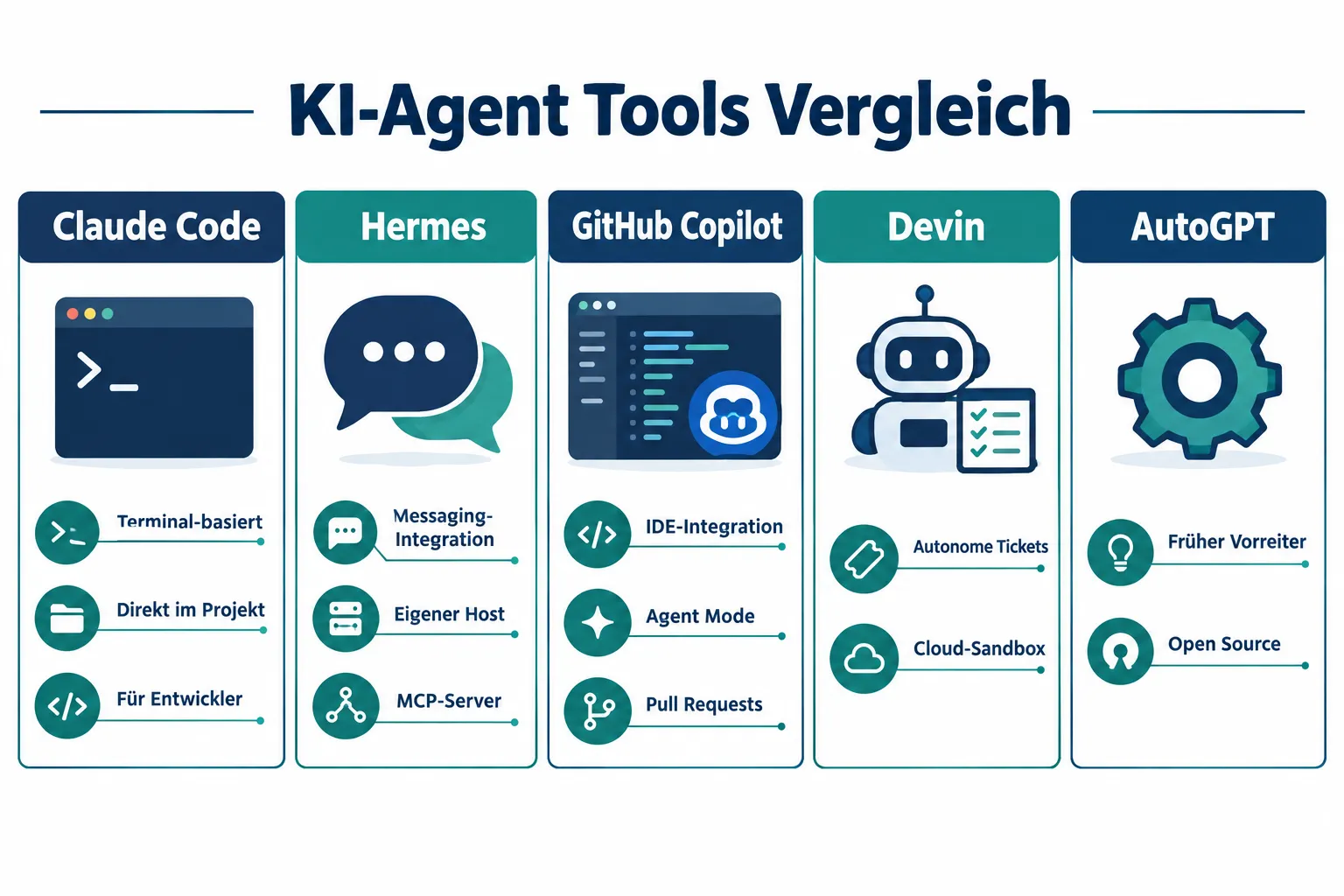
| Tool | Category | Typical Location | Standout Feature |
|---|---|---|---|
| Claude Code | Coding agent | Terminal / project directory | Direct file access, CLI control |
| Hermes | Personal assistant | Own host + messaging | MCP servers, Telegram integration |
| GitHub Copilot Agent Mode | Coding agent | IDE (e.g. VS Code) | Deep editor integration |
| Devin | Autonomous task agent | Cloud sandbox | Handles entire tickets |
| AutoGPT | Autonomous agent (early) | Local / open source | Pioneer project, self-directed steps |
Hosting Options for AI Agents
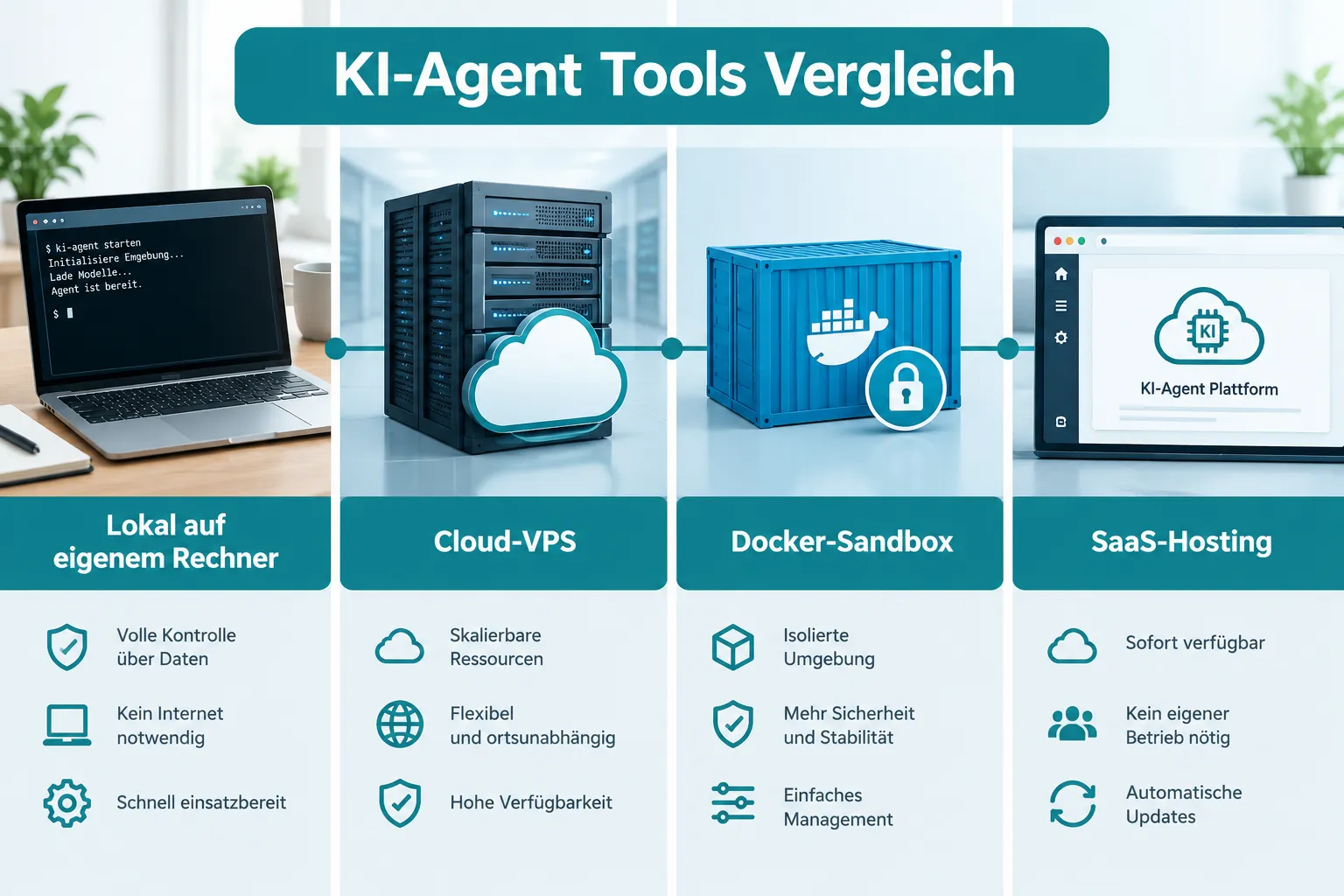
An AI agent tools comparison is incomplete without the question of where the agent actually runs. Hosting determines privacy, cost, control, and how much technical knowledge is needed.
Locally on your own machine. Claude Code typically runs locally in the terminal and accesses local files directly. That means full control, but also: the agent is only active while the machine is running and the terminal is open.
Cloud VPS (Virtual Private Server). For agents meant to be permanently reachable, such as Hermes, which is supposed to receive Telegram messages around the clock, a dedicated server makes sense. The user rents compute capacity, installs the agent as a host, and stays responsible for updates and security themselves.
Docker sandboxes. Many coding and task agents, including variants of Devin and some Copilot agent workflows, use isolated containers. This limits what the agent could do in a worst case, if it executes faulty code or encounters unexpected data. For production-adjacent use, this isolation is an important security argument.
SaaS hosting by the provider. Devin and Copilot Workspace are often offered as a hosted service: the provider supplies the infrastructure, the user simply logs in. This lowers the barrier to entry considerably, but also means the data and execution environment sit with the provider.
“The choice of hosting isn’t a minor technical detail, it determines who has access to your code, your messages, or your data.”
A quick orientation:
- Local: maximum control, least persistence
- Cloud VPS: permanently reachable, requires server knowledge
- Docker sandbox: security-focused, somewhat more setup effort
- SaaS: fastest entry, least control over infrastructure
AI Agent Tools Compared in Detail: Claude Code, Hermes, Copilot, and Devin
At first glance, all four tools look like “AI help for tasks”. In practice, they differ significantly in target audience, way of working, and integration.
Claude Code targets developers who want to work directly in their existing codebase without leaving a graphical interface. The agent reads the project directory, understands file structure and dependencies, and runs commands in the terminal. Anyone already comfortable with the terminal will find an agent here that fits seamlessly into existing Git workflows.
Hermes pursues a different goal: it’s not primarily about code, but about personal automation in everyday life. Tasks can be phrased via messaging apps like Telegram, and thanks to MCP server support, the agent can access external services, such as calendars, note tools, or other APIs, as described in part 2 of this series. Because Hermes runs as its own host, the environment stays in the operator’s hands, which is particularly relevant for private users or small teams who value owning their own infrastructure.
GitHub Copilot with Agent Mode or Workspace stays closest to the classic developer’s everyday routine: the IDE is the workplace, the agent proposes changes directly in the editor, creates branches, and opens pull requests. For teams already relying on GitHub as their central platform, this is an obvious entry point without a tool break.
Devin aims higher: not just code suggestions, but independently handling complete tickets, including planning the intermediate steps. That makes Devin interesting for teams wanting to delegate routine work, but it also requires more trust in autonomous decisions, since fewer intermediate steps are manually checked.
The central difference can be summarized like this: Claude Code and Copilot work where code already lives. Hermes works where people already communicate. Devin tries to go a step further and take on entire task packages itself.
Which Tool Fits You?
An AI agent tools comparison stays theoretical as long as it isn’t applied to concrete situations. The following breakdown helps with a first orientation, without claiming to cover every edge case.
- You’re a developer working in the terminal every day: Claude Code fits, because it stays directly in the project directory and fits into existing Git workflows.
- You want to automate everyday tasks via a chat app: Hermes is the obvious choice, especially if MCP connections to other tools are desired and your own host is acceptable.
- Your team lives in GitHub and an IDE: Copilot Agent Mode keeps the transition to a minimum, because nothing happens outside the familiar environment.
- It’s about larger, self-contained task packages and more autonomy is desired: Devin is worth a look, but also demands more trust in autonomous decisions and a cloud sandbox environment.
- You want to understand how early autonomous agents worked: AutoGPT provides this historical context, though it’s rarely the first choice for productive everyday work today.
Important: the tools don’t exclude each other. Many developers use Claude Code for coding tasks and in parallel an agent like Hermes for non-code-related automation. The decision is rarely “either-or”, but “which tool for which task”.
AutoGPT and the Lessons from the First Generation
AutoGPT deserves its own section because it shows where today’s agent generation comes from. As an early open-source project, AutoGPT demonstrated that a language model can set its own intermediate goals and work through them step by step, without a human entering every single command.
Practical experience with AutoGPT also showed its limits, though: uncontrolled autonomy sometimes led to loops, unnecessary actions, or results that were hard to trace. These lessons have flowed into more modern tools, for example in the form of clearer approval steps in Claude Code, more structured workflows in Copilot Workspace, or limited sandbox environments in Devin. Anyone doing an AI agent tools comparison today benefits directly from these early lessons: more control, more transparency, clearer boundaries for what an agent is allowed to do independently.
Conclusion and Next Steps
Choosing the right AI agent depends less on the hype around a particular tool than on the concrete task. Claude Code belongs in developers’ terminals, Hermes in the everyday messaging routine, Copilot in the IDE of existing teams, Devin on larger, self-contained task packages, and AutoGPT remains important as a historical reference point to understand where current development comes from.
As a next step, it’s worth picking a concrete, manageable task, such as a small bugfix or a single automation, and trying out exactly one tool with it before larger workflows depend on it. At the same time, the hosting question should be clarified early: anyone processing sensitive data should weigh local or Docker-based solutions against pure SaaS hosting. Anyone who has understood the basics from Part 1 (chatbots vs. agents) and Part 2 (MCP, Memory, Skills, Hooks) of this series now has the tools needed to make their own decision within this AI agent tools comparison independently and with confidence.