A single API call can today replace an entire chain of manual clicks: create a ticket, set a status, notify the team, update a calendar. That is where the real value of the Notion API lies — not in the polished interface, but in the ability to use Notion as a programmable data layer for your own tools.
This is the fourth and final part of the “Notion for Teams” series. The previous articles covered the basics of Notion for teams, building databases and views, and designing team workflows and templates. In this closing article, the perspective shifts: away from the interface, toward the code. It’s about how developers use the Notion API to build their own automations, syncs, and integrations.
Table of Contents
Key Takeaways
- The Notion API is a REST API with JSON responses, accessed via Internal Integrations and Bearer token authentication.
- Typical use cases are automatically creating and updating database entries, and syncing external data sources with Notion.
- Rate limits require retry logic with exponential backoff and, for larger volumes, batch processing instead of individual calls.
- Official SDKs (JavaScript, Python) reduce boilerplate code, while raw REST calls offer maximum control with minimal dependencies.
- In 2026 the Notion Developer Platform is visibly evolving toward agents, Workers, and Database Sync — a trend developers should factor into new projects.
What Is the Notion API? Basics for Developers
The Notion API is a classic REST API that accepts HTTPS requests and returns JSON. It allows read and write access to pages, databases, blocks, comments, and, with recent extensions, even AI notes and administrative functions via an expanded Admin API [1].
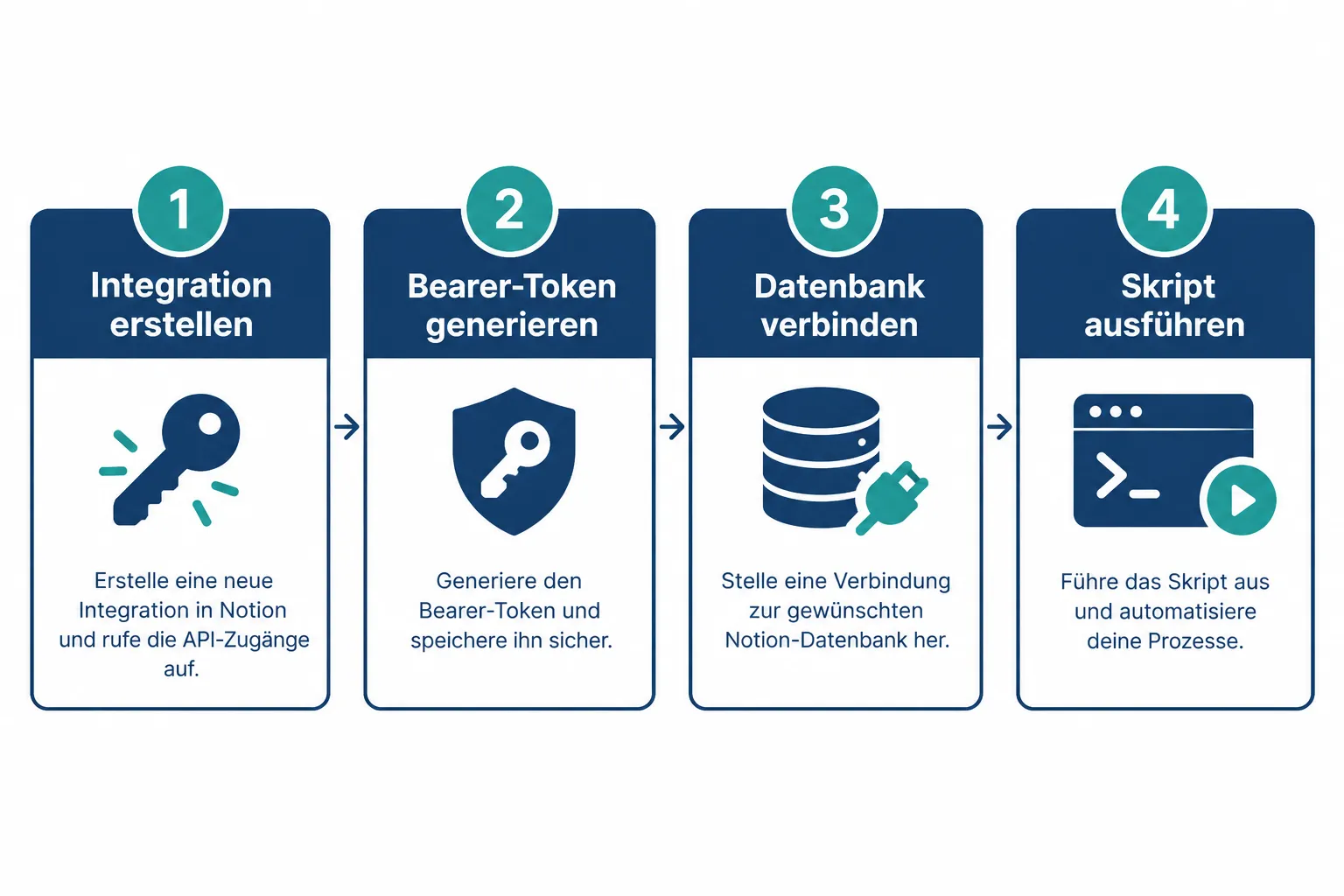
Access happens through so-called integrations. For internal automations, an Internal Integration is enough: it is created inside the workspace, receives a secret (token), and is then explicitly connected to individual pages or databases. Without that explicit connection, the integration — and therefore your script — sees nothing at all, even with a valid token.
Authentication happens via a Bearer token in the HTTP header:
Authorization: Bearer secret_XXXXXXXXXXXXXXXXXXXXXXXX
Notion-Version: 2022-06-28
Content-Type: application/json
The Notion-Version header is not optional — it’s required. Notion explicitly versions its API so that breaking changes don’t silently break existing integrations. Omitting the header risks unpredictable behavior with future updates.
For public integrations meant to run across multiple workspaces, OAuth also comes into play: users authorize the integration via a consent screen, and the integration receives scope-based capabilities (read, write, comment) instead of full access. This granular permission model is now a standard part of the developer workflow and is managed via the new Developer Portal, which was overhauled in August 2026 and makes integrations manageable directly from the workspace interface [3].
Typical Use Cases for the Notion API in Practice
In practice, most Notion API projects boil down to a handful of patterns:
- Automatically creating entries: form submissions, support tickets, or orders land as new rows in a Notion database.
- Updating existing entries: status fields, due dates, or assignments are changed via script based on external events.
- Content synchronization: content from a CMS, a CRM, or a spreadsheet is regularly reconciled with Notion so teams don’t have to switch between tools.
- Reporting and aggregation: data from multiple databases is read, aggregated, and further processed into dashboards or Slack messages.
Syncing external sources in particular is gaining importance. Notion itself is pushing this pattern forward with its Database Sync feature, which serves as a structural foundation for custom automations and lets developers keep external datasets consistently mirrored with Notion databases [2][8].
Code Example: Creating a New Database Entry via the Notion API
The following example shows how to create a new entry in a Notion database — for instance a task tracker — using Node.js and fetch. Prerequisite: the integration has been created in the workspace and connected to the target database.
const NOTION_TOKEN = process.env.NOTION_TOKEN;
const DATABASE_ID = process.env.NOTION_DATABASE_ID;

async function createTask(title, status, dueDate) {
  const response = await fetch("https://api.notion.com/v1/pages", {
    method: "POST",
    headers: {
      Authorization: `Bearer ${NOTION_TOKEN}`,
      "Notion-Version": "2022-06-28",
      "Content-Type": "application/json",
    },
    body: JSON.stringify({
      parent: { database_id: DATABASE_ID },
      properties: {
        Name: {
          title: [{ text: { content: title } }],
        },
        Status: {
          select: { name: status },
        },
        "Due Date": {
          date: { start: dueDate },
        },
      },
    }),
  });

  if (!response.ok) {
    const error = await response.json();
    throw new Error(`Notion API error: ${error.message}`);
  }

  return response.json();
}

createTask("Update API documentation", "In Progress", "2026-03-15")
  .then((page) => console.log("Created:", page.id))
  .catch((err) => console.error(err));
The structure of properties matters: it must exactly match the column names and types of the target database. A select field expects a different object shape than a date or title field. If you don’t know the database’s property types, you can fetch them in advance via GET /v1/databases/{database_id}, which saves a lot of trial and error.
Rate Limits and Best Practices for Stable Notion API Integrations
The Notion API limits the request rate per integration. Exceeding that limit returns a 429 Too Many Requests status along with a Retry-After header. For production automations, the following practices are recommended:
- Exponential backoff: on a 429 error, don’t retry immediately — double the wait time after each failed attempt.
- Retry logic with an upper limit: give up after three to five attempts and log the error instead of retrying indefinitely.
- Batch processing: for larger volumes, don’t fire hundreds of individual requests in parallel — process them in batches with short pauses between chunks.
- Respect idempotency: before creating an entry, check whether it already exists (e.g. via a unique ID property) to avoid duplicates on retries.
- Handle pagination correctly: queries via
POST /v1/databases/{id}/queryreturn at most 100 results per page; thenext_cursormust be processed iteratively.
A simple retry pattern in JavaScript:
async function withRetry(fn, maxAttempts = 5) {
  let attempt = 0;
  while (attempt < maxAttempts) {
    try {
      return await fn();
    } catch (err) {
      attempt++;
      const wait = Math.pow(2, attempt) * 1000;
      await new Promise((r) => setTimeout(r, wait));
    }
  }
  throw new Error("Maximum number of attempts reached");
}
For compute-intensive, long-running automations, Notion has also offered its own Workers runtime with credit-based billing since August 2026, letting you run automation logic directly inside the Notion platform instead of operating an external server [3][4]. This reduces infrastructure overhead, but is mainly relevant for teams already deeply embedded in the Notion platform.
Notion SDK vs. Raw REST Calls: What Fits Your Project?
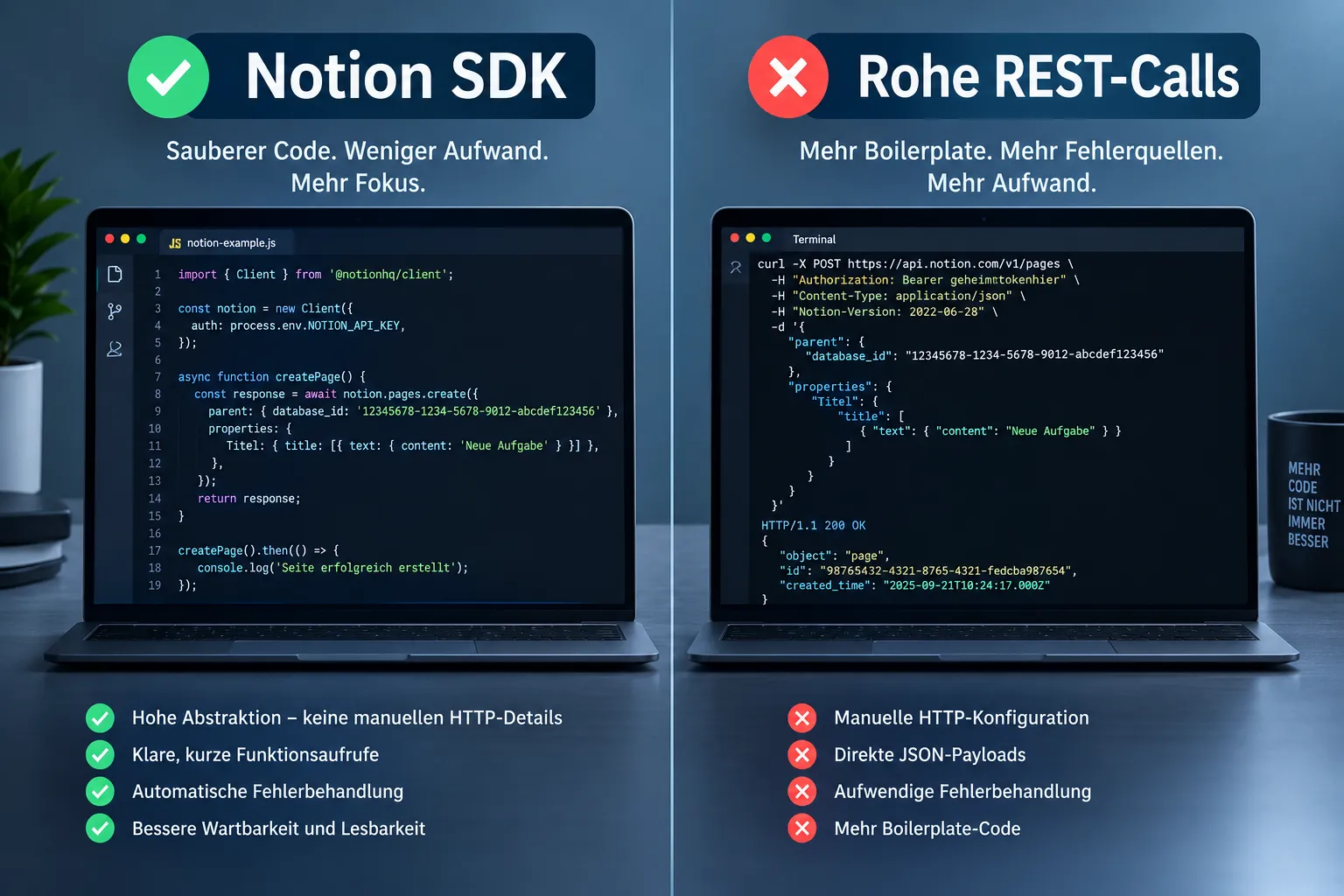
There are two fundamental ways to access the Notion API: the official SDK or direct HTTP calls.
| Criterion | Official SDK | Raw REST Calls |
|---|---|---|
| Getting-started effort | Low, clear methods | Higher, manual header management |
| Dependencies | Extra package required | None, just an HTTP client |
| Flexibility | Bound to the SDK version | Full control over requests |
| Maintenance | Kept up to date by Notion | You handle changes when the API changes |
The official JavaScript and Python SDKs wrap authentication, headers, and pagination in readable method calls. An SDK-based call looks like this:
from notion_client import Client

notion = Client(auth=NOTION_TOKEN)

notion.pages.create(
    parent={"database_id": DATABASE_ID},
    properties={
        "Name": {"title": [{"text": {"content": "New Task"}}]},
        "Status": {"select": {"name": "Not started"}},
    },
)
The code is shorter, but the underlying logic is identical to the raw REST call. For small scripts, prototypes, or serverless functions with a tight dependency budget, raw calls make sense; for larger codebases with many API interactions, the SDK pays off through better readability and fewer bugs. Industry analyses of build-vs-buy decisions for automations regularly conclude that SDKs cut development time, while raw integrations make sense when maximum control over retry behavior and payload structure is required [5][6].
Outlook: Notion Developer Platform 2026, Workers, Agents, and Database Sync
The Notion Developer Platform has evolved significantly toward AI-driven automation in 2026. Alongside the already-mentioned Workers, External Agents and Custom Agents APIs were introduced, moving into public beta in the third quarter of 2026, and let external AI agents like Claude Code, Cursor, or Codex connect directly to Notion workspaces [7][9].
For developers, this means automations increasingly run not just as classic cron scripts, but as agent-based workflows orchestrated across a directory structure of connections and integrations. The Connections overview, updated in September 2026, now lists a wide range of pre-built integrations that can serve as a starting point for custom extensions [10].
In parallel, efficiency improvements for database operations were introduced via the Model Context Protocol (MCP), reducing token consumption for AI-assisted queries — relevant for anyone feeding Notion data into LLM-based applications [2][8]. This development is part of a larger trend toward an “Agent Hub,” where Notion is not just a data store but an active orchestrator for AI-driven tasks [9]. How strongly this trend solidifies by the end of 2026 and beyond remains speculative, but developers building automations today should already factor agent and sync interfaces into their architecture decisions.
Conclusion and Next Steps
The Notion API turns Notion from a pure team tool into a programmable platform. Once you understand the basics — Internal Integrations, Bearer token authentication, and the correct structure of properties — you can build your own automations in just a few lines of code: from simple task creation to complex synchronization processes with external systems.
A pragmatic path to get started: first create an Internal Integration, connect it to a test database, and adapt the code example shown above. After that, it’s worth looking at rate-limit handling and retry logic before building production workloads on top. If you regularly process larger volumes of data or want to connect AI agents, evaluate the newer features of the Notion Developer Platform — Workers, Database Sync, and the Agents APIs — early, rather than retrofitting them into an existing architecture later.
With that, the “Notion for Teams” series comes to a close: from the basics, through databases and team workflows, to programmatic extension via the API. The next logical step now lies with every developer team itself — in its own workspace, with its own code.
References
[1] Changelog – https://developers.notion.com/page/changelog [2] Notion Developer Platform 2026 Workers External Agents Api Database Sync Guide 3mea – https://dev.to/akaranjkar08/notion-developer-platform-2026-workers-external-agents-api-database-sync-guide-3mea [3] 2026 08 19 – https://www.notion.com/releases/2026-08-19 [4] 2026 05 13 – https://www.notion.com/releases/2026-05-13 [5] Notion – https://modsignal.io/vendors/notion [6] Notion Releases – https://releases.sh/notion/notion-releases [7] News – https://creatorstoolbox.com/tools/notion/news [8] Notion Developer Platform Workers External Agent Api 2026 – https://effloow.com/articles/notion-developer-platform-workers-external-agent-api-2026 [9] Notion Opens Workspace Claude Code Cursor Codex Native Ai Agents – https://www.techtimes.com/articles/317092/20260525/notion-opens-workspace-claude-code-cursor-codex-native-ai-agents.htm [10] Connections – https://www.notion.com/connections
Frequently Asked Questions
How do you authenticate with the Notion API?
Through an Internal Integration using a Bearer token in the HTTP header, combined with the required Notion-Version header that pins the API version.
What are common use cases for the Notion API?
Automatically creating and updating database entries, syncing content with external tools, and pulling data from multiple databases for reporting and aggregation.
How should developers handle Notion API rate limits?
With exponential backoff on 429 errors, a capped retry loop, batching for large volumes of requests, and correctly paginating results via the next_cursor.
Official SDK or raw REST calls for the Notion API?
The SDK suits larger codebases thanks to less error-prone boilerplate, while raw REST calls fit small scripts or dependency-light projects that need full control over requests.