Since October 7, 2026, ChatGPT no longer answers in sentences alone. It builds buttons. It draws charts. It constructs small calculators right inside the chat window while the answer is still forming. What sounds like a minor detail is actually one of the biggest shifts in ChatGPT’s history: with GPT-6 Intelligent UI, OpenAI is fundamentally changing how artificial intelligence communicates with people.
More than 1.2 billion people use ChatGPT every week. For all of them, the way answers look is changing starting now. This article explains exactly what GPT-6 Intelligent UI is, how the technology behind it works, where its limits lie, and what it means for developers and everyday users.
Table of Contents
Key Takeaways
- OpenAI officially introduced GPT-6 on October 7, 2026, including the new Intelligent UI feature, which replaces text answers with interactive interfaces.
- GPT-6 is now available to more than 1.2 billion weekly ChatGPT users, not just paying customers.
- Intelligent UI generates buttons, forms, charts, and small tools such as calculators or interactive maps directly in the chat, built on a proprietary UI component library and a progressive compiler.
- For web searches, the first answer is reported to arrive roughly 44 percent faster, because GPT-6 starts answering while it is still “thinking.”
- In the top-tier reasoning mode GPT-6 Astra, Intelligent UI currently does not work — that mode still relies on classic text output.
What exactly is GPT-6 Intelligent UI?
GPT-6 Intelligent UI is a new capability that lets ChatGPT independently decide whether an answer is better presented as text, a table, a chart, or a small interactive tool. According to the official OpenAI blog post at openai.com/index/gpt-6-for-everyone, this is one of the central innovations of GPT-6. Both MacRumors and TechRepublic confirmed this characterization in their own coverage.
In practice this means: if a user asks something about splitting a dinner bill among friends, ChatGPT no longer produces a plain paragraph of text. Instead, a small, clickable calculator appears right in the chat. If asked about a travel route, an interactive map can appear. For data comparisons, the model builds a chart that can be used directly.
The idea itself isn’t entirely new — other chat systems have experimented with embedded widgets before. What’s new is the scope and depth of the integration: OpenAI positions Intelligent UI as a core part of GPT-6, not an experimental add-on feature.
“ChatGPT no longer answers only with words. It answers with tools.”
That phrase captures the essence of the change: the answer itself becomes the interface.
How GPT-6 Intelligent UI works technically
Behind GPT-6 Intelligent UI is not a simple formatting feature, but a dedicated technical infrastructure built by OpenAI. According to the OpenAI blog post, confirmed by MacRumors, the feature rests on two core building blocks.
First, there is a library of native, streamable UI components — prebuilt building blocks like buttons, input fields, chart types, and map modules that the model can combine depending on context. Second, a compiler running in the background assembles these components progressively while the model is still generating its response.
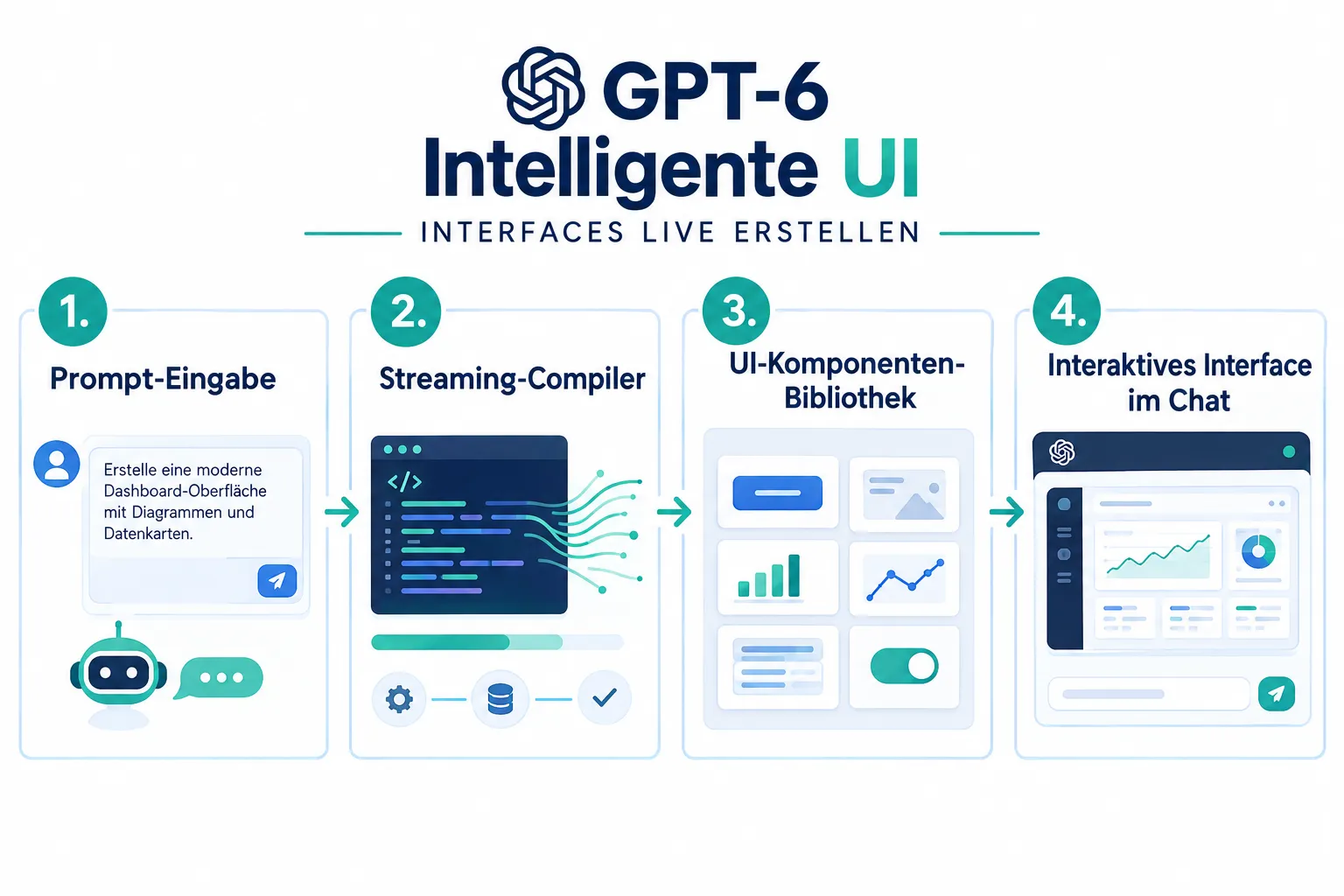
That has a practical benefit for users: they don’t have to wait until the complete answer has finished generating. The interface builds piece by piece while the model is still working. According to the “Daily AI Download” summary from October 9, 2026, which was partly picked up by TechRepublic as well, GPT-6 already starts answering while it is still “thinking” in the background. For web searches, the first visible answer is reported to arrive roughly 44 percent faster as a result.
The table below summarizes the technical difference between classic text output and GPT-6 Intelligent UI:
| Feature | Classic text answer | GPT-6 Intelligent UI |
|---|---|---|
| Output format | Plain running text | Buttons, forms, charts, mini-tools |
| How the answer builds | Answer appears complete after generation finishes | Interface builds progressively during generation |
| Interactivity | None, reading only | Clicking, entering data, direct operation |
| Technical basis | Standard text generation | UI component library plus streaming compiler |
| Speed on search queries | Standard | Roughly 44 percent faster first answer, per reports |
This architecture shows that OpenAI doesn’t intend Intelligent UI as a cosmetic design update, but as a structural extension of how the model generates answers in the first place.
Rollout: who can already use GPT-6 Intelligent UI?
The rollout of GPT-6 Intelligent UI happened in two steps. Paying customers got early access to the feature already in September 2026. The broad rollout to Free and Go users followed on October 7 and 8, 2026, as reported by both the official OpenAI blog post and MacRumors.
That means Intelligent UI is no longer an exclusive premium feature today, but part of the standard functionality available to more than 1.2 billion weekly ChatGPT users. That’s notable, because deep technical innovations at OpenAI have historically often been reserved for paying subscribers first.
Concretely, for users this means:
- Anyone using ChatGPT for free will also see interactive interfaces instead of plain text blocks starting in October 2026.
- Go and Plus users already had access and early hands-on experience since September 2026.
- The feature is integrated model-wide into GPT-6, not marked as a separate add-on product.
Limits: GPT-6 Astra and the gap in Intelligent UI
As far as the progress goes, there is a clear limitation. In the high-end reasoning mode GPT-6 Astra, GPT-6’s highest-thinking-effort tier, Intelligent UI is currently not supported. This is confirmed by the Daily AI Download summary from October 9, 2026.
That means: anyone using GPT-6’s maximum depth of reasoning for complex analysis, mathematics, or deep reasoning tasks still gets classic text answers without buttons, charts, or interactive elements.
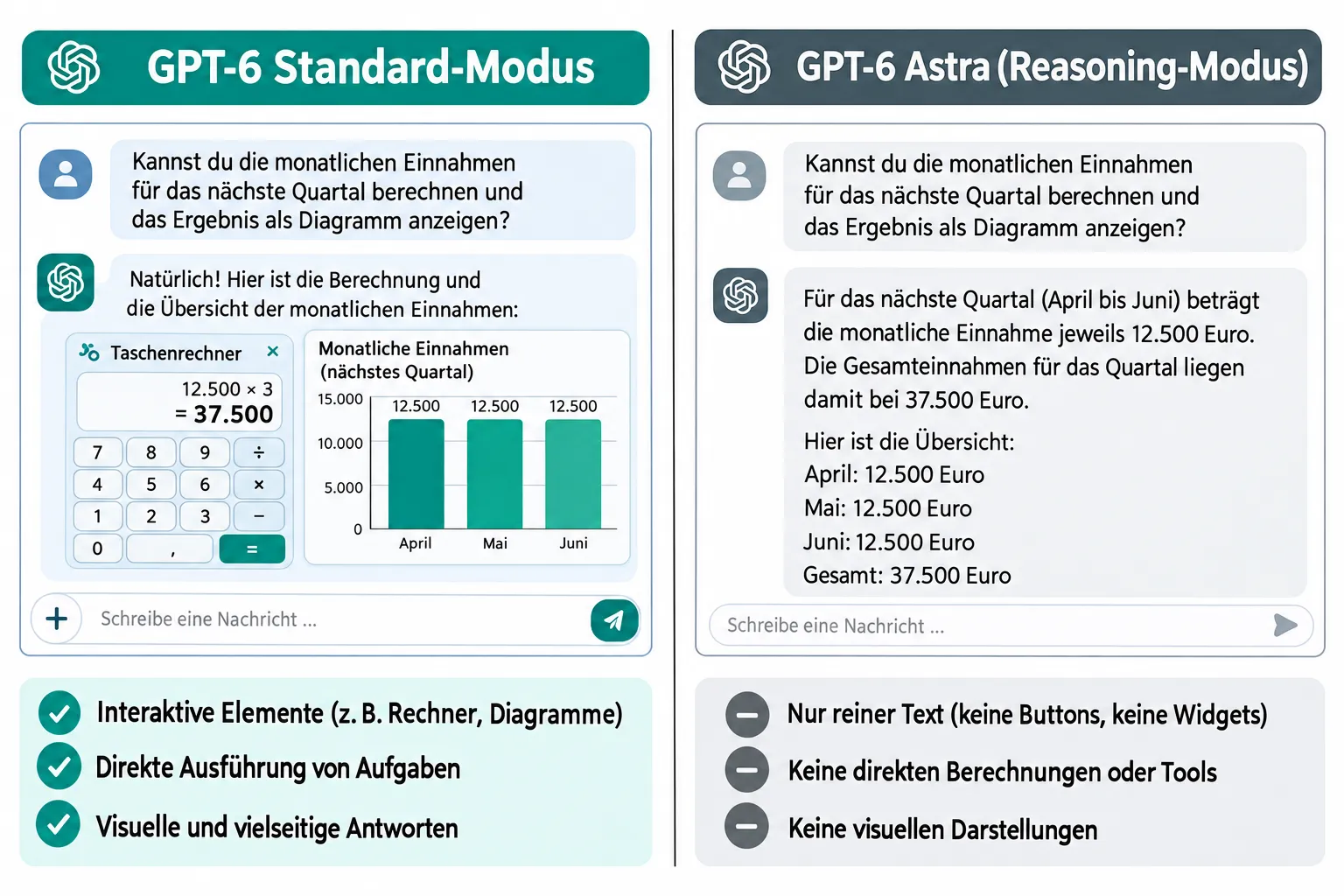
This separation looks like a step backward at first glance, but it makes sense. Reasoning models like GPT-6 Astra are optimized for maximum thinking performance, not for presentation variety. The extra compute load needed to build interactive interfaces would likely collide with the demands of deep reasoning. OpenAI itself has not described this limitation as permanent, but rather as the current state of the technology.
For developers and power users, this is an important point: anyone relying on Intelligent UI — for visual applications or client projects, for example — should carefully check which GPT-6 mode is active in the background. For a look at the more affordable variant of this model family, see our article on GPT-6.1 Sol, which comes close to top-tier performance despite its lower price.
Criticism and community reactions
Not every reaction to GPT-6 Intelligent UI has been entirely positive. OpenAI itself acknowledges, according to its own blog post, that the model’s design judgment still needs work. That’s an unusually open admission for a newly launched flagship feature.
Reactions within the community have been mixed so far. According to the AI to ROI newsletter from October 9, 2026, one commentator described the heavily formatted output as “condescending.” The implication seems to be a sense that the model is dictating to users how to consume information, rather than flexibly adapting to individual preferences.
This criticism matters because it highlights a fundamental tension:
- Interactive interfaces can make complex information easier to understand.
- At the same time, they can feel forced or intrusive when a simple sentence of text would have sufficed.
- Users with different preferences — some favor compact text, others visual elements — have to adapt to a new default behavior.
It remains to be seen whether OpenAI will adjust course in upcoming updates, for example through settings that let users choose how aggressively Intelligent UI is applied.
What GPT-6 Intelligent UI means for developers and users
For developers building on the OpenAI platform, Intelligent UI potentially opens up new possibilities. Applications that previously had to deliver plain text answers could in the future embed interactive elements directly, without having to write custom frontend logic for every individual use case.
For everyday ChatGPT users, the experience is changing gradually. Simple tasks like splitting a bill, calculating numbers, or visualizing data now happen directly in the chat, without needing an external app or website.
At the same time: Intelligent UI is no silver bullet. The limitation in GPT-6 Astra shows that the technology doesn’t yet work equally smoothly everywhere. And the community criticism makes clear that not every visual upgrade is automatically perceived as an improvement.
Anyone who wants to actively use the feature should keep the following in mind:
- Check whether the GPT-6 mode in use actually supports Intelligent UI, since the feature is missing in Astra mode.
- Actively give feedback on the presentation, since OpenAI says it is still developing the model’s design judgment.
- For complex, pure reasoning tasks, lean toward the reasoning mode; for everyday, visually supportable tasks, use the standard mode with Intelligent UI.
Conclusion
GPT-6 Intelligent UI marks a turning point in ChatGPT’s development: away from plain text output, toward interactive, self-built interfaces. With its launch on October 7, 2026, OpenAI didn’t just release a new model — it changed the fundamental way more than 1.2 billion weekly users interact with it. The technical foundation of a UI component library plus a progressive compiler ensures that answers become faster and more visually usable, especially for web searches.
At the same time, the limitation in GPT-6 Astra mode and the mixed community reactions show that the technology is still in its early stages. Anyone wanting to try GPT-6 Intelligent UI should deliberately switch between standard mode and reasoning mode depending on the task, and actively give feedback when the presentation doesn’t fit. That way, the development can be shaped collaboratively while OpenAI continues to refine the feature in the coming months.