According to recent surveys, 87 percent of working professionals in Germany have heard of ChatGPT, but only a fraction have ever typed a question into it themselves. That gap between awareness and actual use is exactly what separates people who put AI to work for them from those who still do everything by hand. This AI for beginners guide closes that gap step by step, without jargon and without assuming any prior knowledge.
Anyone starting out today with AI language models like ChatGPT, Claude, or Gemini doesn’t need any programming skills. All you need is a browser, an email address, and the willingness to experiment for a few minutes. This article shows you exactly that: clearly explained basics, a fair comparison of the most important tools, and concrete examples for writing your first prompts.
Table of Contents
Key Takeaways
- An AI language model is a text-prediction system that calculates the most probable, sensible answer to an input based on vast amounts of text.
- ChatGPT is considered a versatile all-round entry point, Claude excels at long, complex texts and code, and Gemini shines within the Google workspace environment.[1][5]
- Free tiers are completely sufficient for the first few weeks; upgrading to Plus or Pro plans only pays off with regular, professional use.[6]
- Clear, specific prompts with context, role, and desired format deliver noticeably better results than vague questions.
- Privacy starts with your own behavior: don’t enter sensitive data, passwords, or health information into the chat.
What Is an AI Language Model? The Basics Explained for AI Beginners
An AI language model, also called a large language model or LLM, is essentially a highly powerful computing system for language. It was trained on enormous amounts of text from books, websites, and articles. In the process, the model learned how words typically follow one another. When someone types in a question, the model calculates word by word the most probable, sensible continuation — not by “thinking” the way a human does, but through statistical patterns.
If you want to use AI with your team for daily work, check out our practical overview AI Workspace Tools Compared: WorkLLM vs. Kollab vs. Notion. For a deeper dive into wording your requests, see our guide Prompt Engineering for Beginners: How to Get Better AI Answers.Important for anyone exploring AI for beginners: a language model doesn’t understand facts in the human sense. It recognizes patterns and relationships in language. That also explains why such systems sometimes present false information with great confidence, a phenomenon known as “hallucination.” Keeping that in mind helps you use AI more realistically and critically right from the start.
Modern models like GPT-5.6 or Claude Opus 5 also feature an adjustable “reasoning effort”: depending on how complex the question is, the system can invest more or less computing time in its answer.[28][32] For beginners, that means simple questions get answered quickly, while more complicated tasks can be deliberately handled more thoroughly via a slider or a button like “Think.”[16][24]
ChatGPT, Claude, and Gemini Compared: Which Tool Suits AI Beginners?
All three major chatbots are built on similar technology but differ significantly in character, strengths, and use case. Comparative analyses rank ChatGPT as a particularly versatile all-round assistant for beginners, while Claude is considered especially strong for long, complex texts and program code. Gemini, in turn, plays to its strengths mainly in teams that already work with Google Workspace.[1][5]
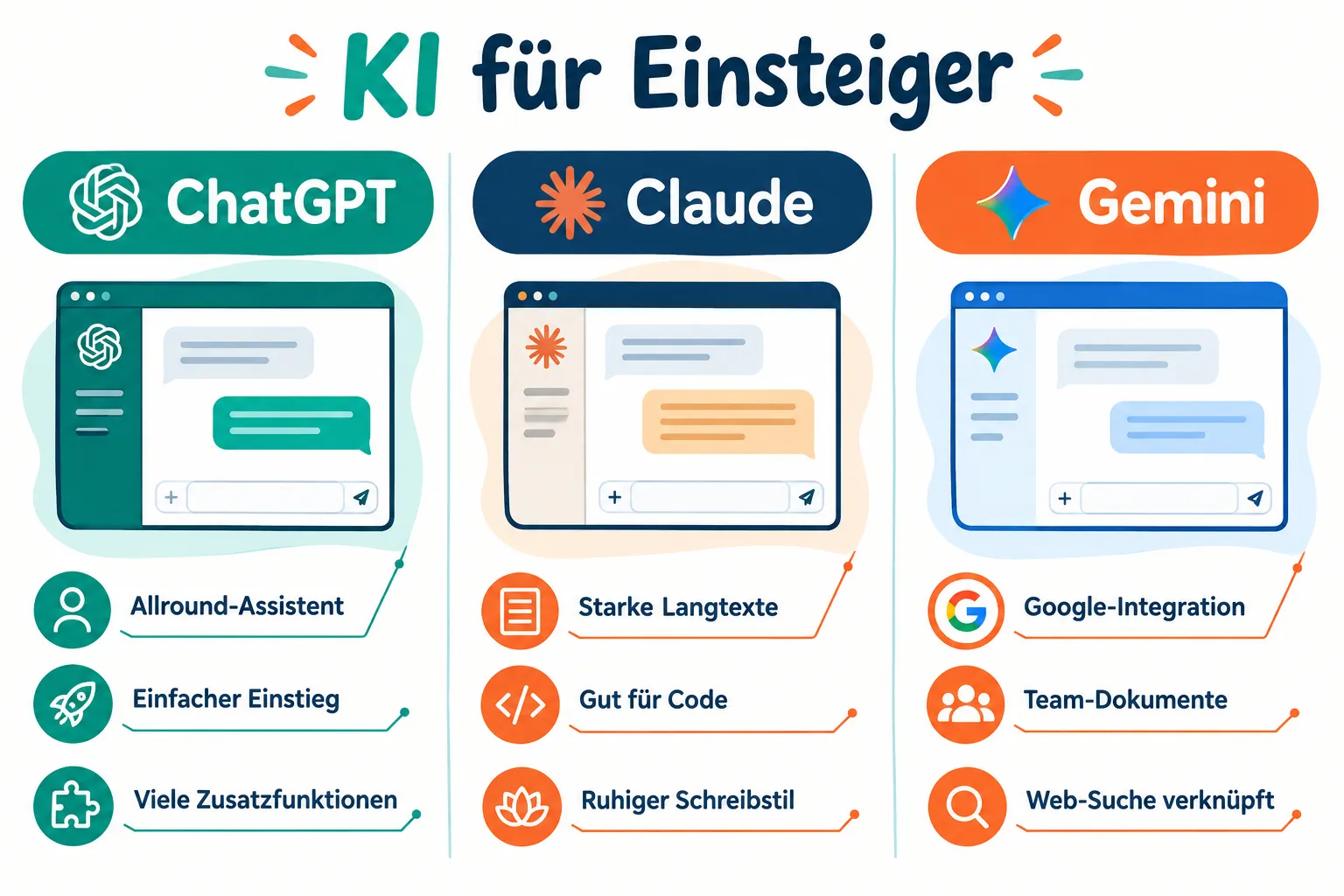
A practical beginner tip from current guides: try the same task, such as writing a short email, once with ChatGPT, once with Claude, and once with Gemini. This lets you experience the different writing style and “personality” of each model firsthand.[5][13][14]
| Feature | ChatGPT | Claude | Gemini |
|---|---|---|---|
| Best for | Everyday tasks, all-round use | Long texts, code, analysis | Google Workspace users |
| Getting started | Very beginner-friendly | Somewhat more structured | Directly integrated into Google apps |
| Writing style | Direct, practical | Detailed, thoughtful | Compact, fact-oriented |
When it comes to free tiers: ChatGPT Free now offers unlimited text chats plus an additional “Think” button for more complex questions, which makes experimenting considerably easier for beginners.[16][22][24] Those who use these tools regularly and professionally typically pay between 22 and 25 euros per month for Plus or Pro plans from ChatGPT and Claude in Germany, and noticeably more with very heavy use.[6] For getting started, the free version is almost always enough.[6][1]
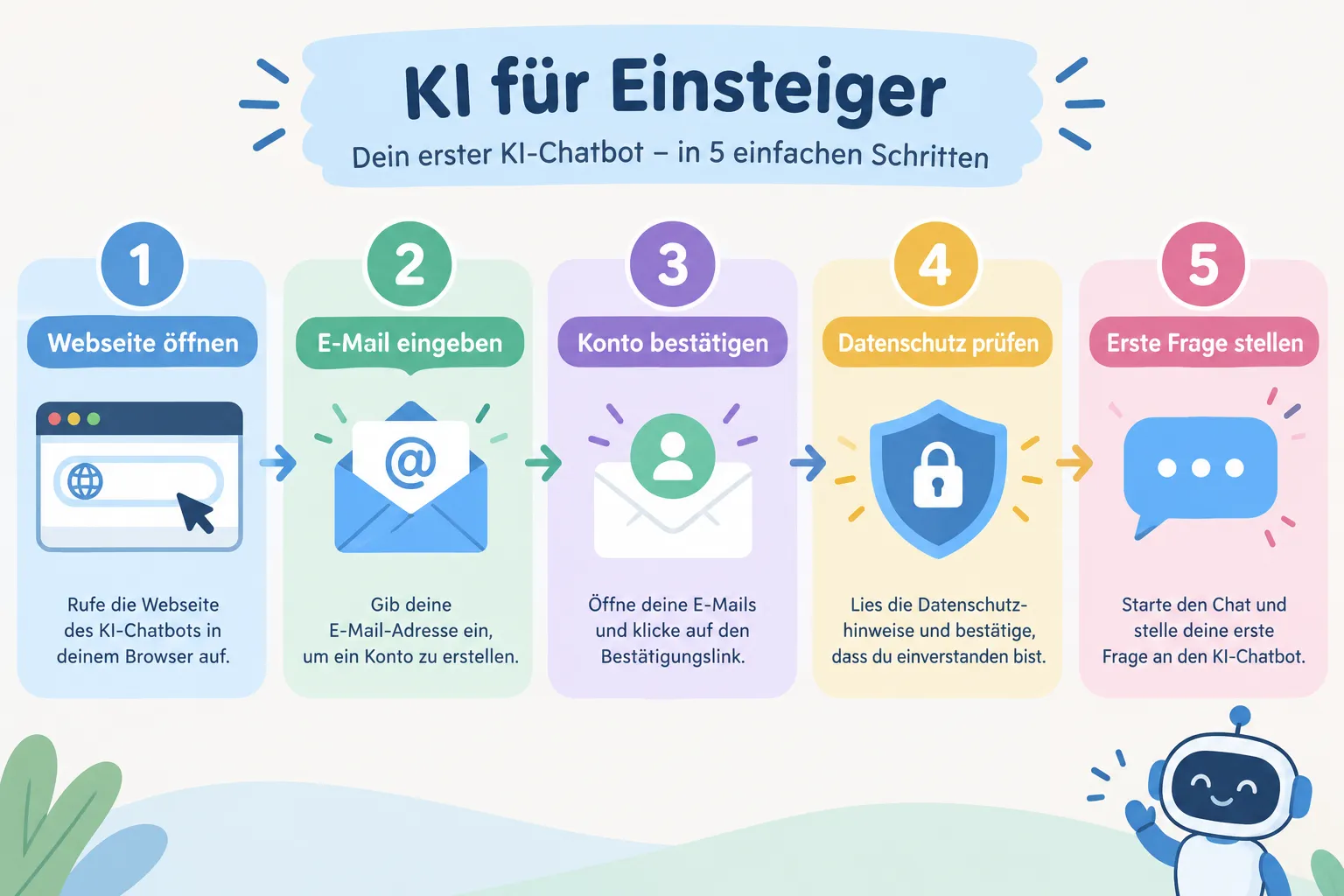
Step by Step: How AI Beginners Create Their First Account
Getting started takes just a few minutes. The following process works almost identically for ChatGPT, Claude, and Gemini:
- Open the website. Go to the official site of the respective provider (chatgpt.com, claude.ai, or gemini.google.com).
- Create a free account. Sign up with an email address or an existing Google account.
- Confirm your email. Click the confirmation link sent to your inbox.
- Check the basic settings. Set the language and, if available, save personal instructions (“Custom Instructions”), such as your preferred tone or area of expertise.[2][13]
- Enter your first test question. For example, ask a simple everyday question to get a feel for how the model responds.
Current step-by-step guides also recommend deliberately taking time in the first few days for typical beginner tasks: drafting emails, revising text, outlining a presentation, or uploading a file for analysis.[2][5][13] This quickly builds a realistic sense of each AI’s strengths and limitations.
Those who want to move beyond the generic starting point and work in a specific field will now also find industry-specific variants, for example for financial services or legal applications, which offer pre-structured environments instead of an open chat.[26][27][30]
Writing Your First Prompts: Practical Examples for AI Beginners
A “prompt” is simply the input you send to an AI language model. The clearer that input is, the better the answer. A proven basic pattern for AI for beginners contains three building blocks: the model’s role, the specific task, and the desired format.
Examples of well-formulated beginner prompts:
- “You are a friendly language teacher. Explain the difference between ‘affect’ and ‘effect’ in three simple sentences with examples.”
- “Write a short, polite email to my landlord reporting a broken heater. Maximum 100 words.”
- “Summarize the following text in five bullet points: [insert text]”
- “Create an outline for a 10-minute presentation on time management while working from home.”
“A good AI answer almost always starts with a good question — clarity in the prompt is the biggest lever for beginners.”
It’s also worth knowing that results can be refined. If you’re not happy with the first answer, simply ask again: “Make that shorter” or “Phrase that more formally.”
Common Beginner Mistakes When Prompting, and How to Avoid Them
Many beginners don’t struggle with the technology itself, but with how they phrase their questions. The following mistakes can be avoided with a little practice:
- Being too vague. “Write me something about marketing” produces generic answers. Better: state a specific goal, target audience, and length.
- Missing context. Without background information, the model has to guess. Important details like industry, occasion, or target person belong in the prompt.
- Cramming everything into one request. Complex tasks work better when broken down into several smaller steps.
- Accepting answers blindly. Especially with facts, numbers, or legal questions, the answer should always be double-checked.
- Not asking follow-up questions. A chat is a dialogue — follow-up questions and corrections usually improve the result significantly.
Advanced beginner courses specifically address these patterns and practice structured prompting through hands-on exercises.[3][4]
Privacy Basics for AI Beginners
Privacy isn’t a side issue — it’s part of using AI safely from the very start. Basic rule: treat everything you type into a chat as if it could be stored or analyzed. Sensitive information such as passwords, health data, banking details, or confidential company information has no place in a public chatbot.
One positive signal from the industry: since August 2026, Anthropic has been adding invisible watermarks and C2PA provenance signatures to all newly generated Claude texts, making AI-generated content traceable and distinguishable from human-written text.[32][37][38] Such mechanisms are also relevant in the context of the EU AI Act and are increasingly covered as their own topic in beginner training courses.[3][15]
Another practical point: providers actively document cases of misuse and monitor their systems.[37][38] This shows that modern platforms have extensive safety and control mechanisms in place — but beginners should still take personal responsibility for handling their own data carefully.
Technical reliability also matters: even major providers like Anthropic occasionally report outages affecting individual services, as happened with several Claude components in August 2026.[39][43] For serious workflows, such as training sessions or classroom use, it’s therefore always wise to have a backup plan that doesn’t rely on AI.
What AI Is Really Useful for in Everyday Life
After writing your first prompts, the question usually becomes: where does AI actually pay off in everyday life? The following use cases have proven especially valuable:
- Writing and editing: emails, job applications, summaries, translations.
- Learning and explaining: having complex topics explained in simple language.
- Organization: presentation outlines, to-do lists, schedules.
- Research support: initial orientation on a topic, which is then verified independently.
- Creative work: brainstorming ideas, text variations, alternative phrasings.
Formal courses across the country, from community colleges to professional training academies, teach exactly these practical applications in compact beginner formats, often as a one-day course or online seminar.[3][4][7][10] This shows that AI for beginners is no longer a niche topic, but an established part of basic digital literacy.
Conclusion: The First Step Matters More Than the Perfect Prompt
AI language models aren’t magic boxes — they’re well-trained text tools with clear strengths and equally clear limitations. If you’re just starting out, don’t let the sheer number of models and features put you off. A free account, one clear first question, and a willingness to learn from imperfect answers are all it takes to feel confident using ChatGPT, Claude, or Gemini within a few days.
As a next step, it’s worth creating a free account with one of the three providers, trying three simple everyday tasks, and critically comparing the answers with your own knowledge. Once you’ve mastered this first step, you can move on to more demanding tasks like file uploads, longer writing projects, or industry-specific AI applications.
References
[1] AI Assistants Compared – https://www.ki-syndikat.de/ki-assistenten-vergleich/ [2] A Practical Introduction to Claude and ChatGPT – https://www.sophiehundertmark.com/praktischer-einstieg-mit-claude-und-chatgpt/ [3] AI for Beginners – https://www.cmt.de/kategorien/künstliche-intelligenz/ki-office-prompt-engineering/ki-für-einsteiger/ [4] ChatGPT Basic Course KI1 – https://www.pc-college.de/seminare-schulungen-kurse/künstliche-intelligenz/chatgpt-grundkurs-ki1.php [5] AI Tools for Beginners – https://findskill.ai/de/blog/ki-tools-für-einsteiger/ [6] ChatGPT vs Claude – https://tech-insider.org/de/chatgpt-vs-claude/ [7] Introduction to 3 AI Assistants 617 C 7029078 – https://www.vhs-hanau.de/p/programmbereiche/beruf-karriere-it/computer-it-grundlagen/ki-online-kurs-für-einsteiger/einführung-in-3-ki-assistenten-617-C-7029078 [10] haufe-akademie.de – https://www.haufe-akademie.de/41251
Frequently Asked Questions
What is an AI language model like ChatGPT in simple terms?
An AI language model is software trained on huge amounts of text so it can understand and generate language. It answers questions, writes text, and holds conversations without actually thinking like a human.
Do I need coding skills to use ChatGPT, Claude, or Gemini?
No. All you need is a browser and an email address to sign up. Everything runs through plain-language chat, so no technical background is required.
What is the difference between ChatGPT, Claude, and Gemini?
All three are AI language models with similar core abilities, differing mainly in writing style, context length, and integrations. Any of them is a fine starting point for beginners.
How do I write my first good prompt?
Clearly describe what you want, provide context, and specify the format you expect. The more specific your request, the better the answer you get.