Three platforms, three completely different answers to the same question: how does a company meaningfully bring artificial intelligence into everyday work? WorkLLM launched only in February 2026 out of Toronto and positions itself directly as a governance tool for small and mid-sized businesses. Kollab rethinks content production from the ground up. And Notion, the established incumbent among workspace tools, has been retrofitting its document world with full-fledged AI agents since 2026. Anyone comparing AI tools today therefore needs to weigh not just features against each other, but fundamentally different philosophies.
That is exactly what this comparison delivers: a factual assessment of WorkLLM, Kollab and Notion, based on publicly available product information and independent reviews, without invented features or numbers.
Table of Contents
Key Takeaways
- WorkLLM targets small and mid-sized businesses that want to roll out AI centrally, in a governance-compliant way, and without prompting expertise across the whole team.[9][14]
- Kollab is a content workspace for creators and agencies that generates text, images, slides, video and websites from a single material pool.[6][15]
- Notion remains a document-centric all-rounder whose full AI agent functionality only unlocks at higher pricing tiers.[3][10][12]
- A meaningful AI tools comparison depends heavily on the use case: governance and rollout (WorkLLM), content production (Kollab), or structured knowledge management (Notion).
- All three providers differ significantly in pricing model, target audience and depth of automation — there is no single “overall winner.”
WorkLLM: The Governance-Focused AI Workspace Platform for SMBs
WorkLLM describes itself as an “AI Adoption Platform for SMBs” — a platform designed to make company-wide AI adoption easier for small and mid-sized businesses.[9] Instead of isolated chat windows, the solution offers a central, governance-capable workspace in which access rights, data flows and tools are managed in a bundled way.[4][14] The product explicitly targets teams without deep prompting know-how that still want to use AI reliably in day-to-day operations.[9]
For a deeper look at how the AI agents behind these workspace tools actually work, see AI Agents and Automation: How Autonomous AI Workflows Really Work in 2026. If you’re new to AI language models, start with our guide AI for Beginners: Your First Steps with ChatGPT, Claude, and More.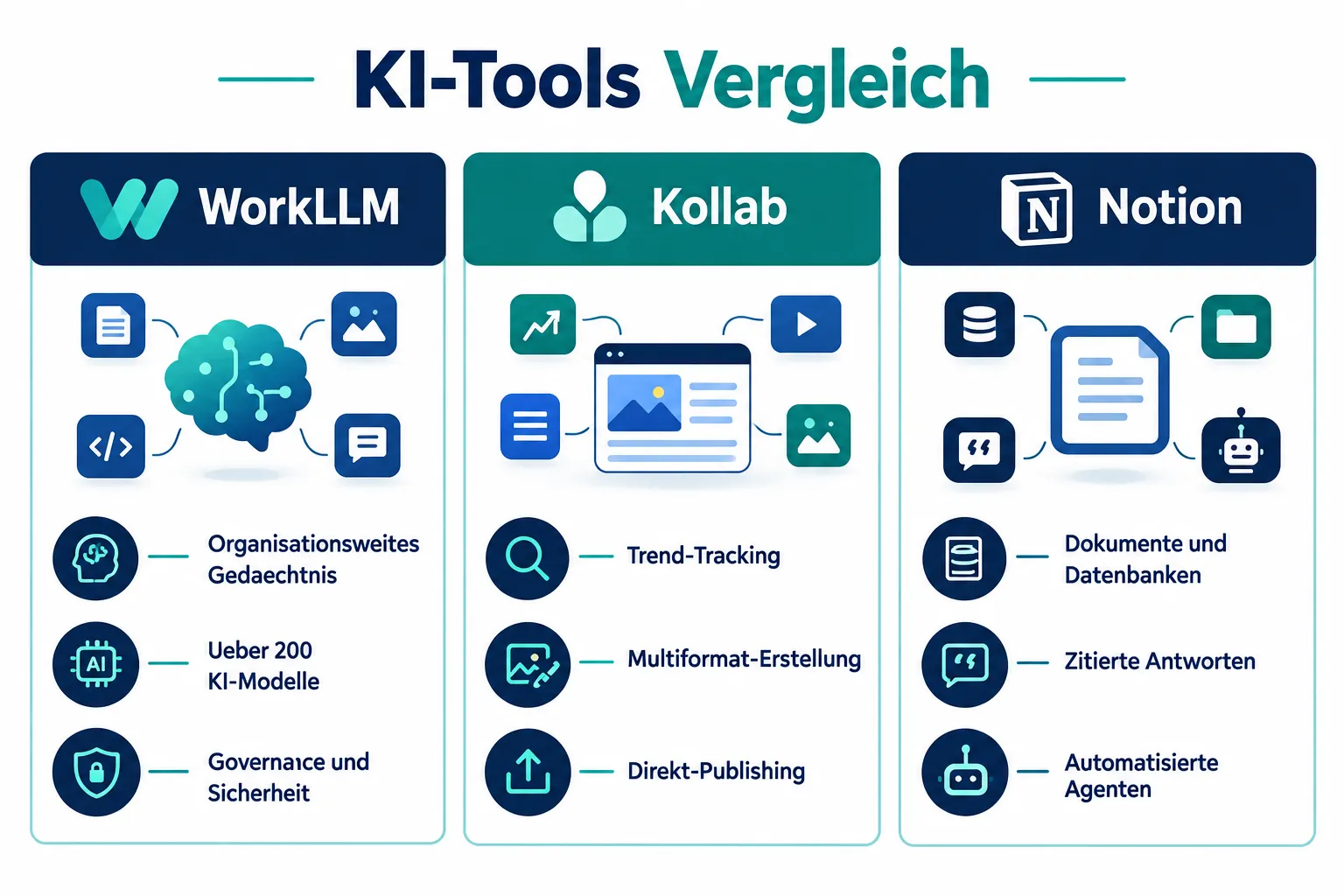
Who Is WorkLLM For
The target audience is clearly defined: small and mid-sized businesses as well as consulting and service firms that want to establish AI not as a gimmick, but as a controlled part of the organization.[4][7] Reviews particularly highlight its suitability for consultants and professional service providers who need predictable AI capacity.[7][8]
Core Features at a Glance
- Organizational Memory across five levels (Thread, Personal, Project, Team, org-wide) that is applied automatically and retains context beyond individual chats.[1][4]
- Model Orchestration with access to over 200 AI models, including GPT, Claude and Gemini, with the ability to compare up to four models in parallel.[1][4][14]
- Ready-made AI agents: Knowledge agents with source citations, task agents for drafts and research, and workflow agents that run automatically and on a schedule.[1][14]
- Team collaboration via shared threads and joint prompting, turning outputs into reusable team assets.[1][14]
- Broad integrations with Gmail, Google Calendar/Drive, Jira, Notion, Slack and CRM systems.[1][14]
- Security & governance features such as physical isolation, encryption and audit logs for enterprise-grade control.[9][14]
Strengths and Weaknesses
Its greatest strength lies in combining security and collaboration in a single tool — an aspect that many pure chat tools lack.[9][14] Reviews rate WorkLLM around 8.7 out of 10 for professional service providers, and more moderately at around 6.9 out of 10 in broader consultant-focused tests.[7][8] Reviewers on marketplaces such as AppSumo also praise efficient file handling and team functionality.[2] A notable pricing feature mentioned in reviews is a one-time payment for lifetime access instead of a classic monthly subscription, though other reviews also describe monthly plans with around 2,000 shared credits per user.[4][7][8] However, teams primarily looking to produce large volumes of content for social media won’t find a specialized creative toolkit here — that’s simply not what the platform is built for.
Kollab: The AI Agent Workspace for Content Teams
Kollab presents itself as an “AI Agent Workspace | Content Creation for Teams,” addressing a different audience than WorkLLM: content creators and agencies that continuously produce content across multiple formats and channels.[6] Instead of governance, creative production speed is at the center here.
Who Is Kollab For
The platform positions itself clearly for creator teams, marketing departments and agencies — not for general office work.[6][15] Anyone already working within ecosystems like Notion, Linear, GitHub, Figma, Canva or Google Drive benefits from deep integration with these tools.[6][11]
Core Features at a Glance
- Trend tracking that surfaces industry signals and platform trends as relevant topics.
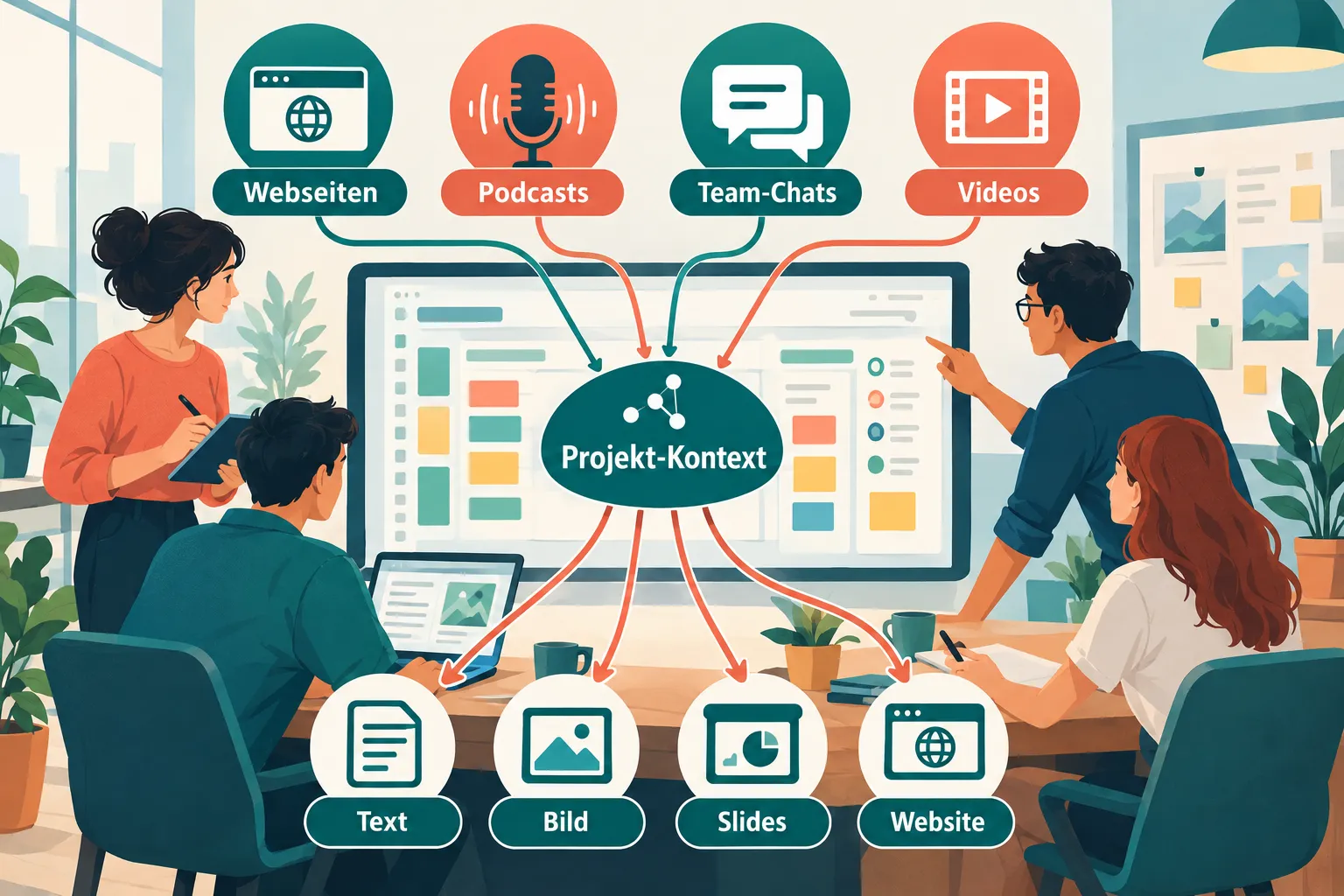
- Material aggregation: websites, documents, podcasts, videos and team chats are parsed and transcribed to build a unified project context.
- Multi-format creation from the same material: text, images, slides, video, websites, and even 3D models.
- A shared project space with brand voice, feedback features and version history.
- Direct publishing to X, Instagram and LinkedIn without needing external tools.
- Modular building blocks like connectors, bots, skills, scheduled tasks and memory, including bot integration in Slack, Discord and LINE.[6]
- Recent extensions with integrated video models like Seedance 2.0 and HappyHorse 1.0 underscore the focus on multimodal creative work.[15]
Strengths and Weaknesses
Kollab impresses with a flexible free tier: the Free plan offers 200 daily credits, 2,000 monthly credits, 1 GB of storage and unlimited team seats.[11][15] The Pro plan at $20/month raises this to 6,000 monthly credits, 1 TB of storage, plus 30 concurrent sessions and 30 scheduled tasks; a “Max” tier for larger workloads runs around $200/month.[11][15] Reviews also praise the long list of connectors and the agent-centric design.[11] The flip side: teams that don’t run continuous content production, but instead need internal governance and knowledge management, won’t find their core need addressed by Kollab — WorkLLM or Notion is the more natural choice there.
Notion: The Established Workspace All-Rounder With AI Agents
Notion carries the tagline “The AI workspace that works for you” and remains, at its core, what it has been for years: an all-in-one platform for documents, wikis and databases, now enhanced with AI agent features.[10] For many solo workers and small teams, Notion is still one of the most ergonomic tools for structured knowledge work.[3]
Who Is Notion For
Notion targets solopreneurs, knowledge workers and creative teams that primarily need documentation, project management and flexible databases.[3][12] According to a customer reference, 98 percent of the Forbes Cloud 100 companies use the platform — an indicator of its broad footprint in enterprise daily life.
Core Features at a Glance
- Knowledge capture into a central “system of record” for company knowledge.
- Instant answers with citations and sources pulled directly from stored documents.
- Custom Agents that automate busywork, such as triaging product feedback, resolving support tickets in Slack, responding to security alerts faster, or generating weekly reports.
- 24/7 running agents that stay active outside working hours too.
Strengths and Weaknesses
Notion’s biggest strength remains its flexibility for documentation and databases — independent analyses continue to describe it as excellent for structured knowledge work.[3][5] At the same time, the same analyses point to a clear weakness: compared with newer AI workspaces, Notion AI is still seen as lacking truly autonomous agents, native automation workflows and multi-model support, as of the respective review dates.[3][5][12]
On top of that, the pricing model significantly limits access to full AI functionality. The Free and Plus plans offer only limited AI trial usage, or 20 lifetime AI responses. Only the Business plan, at $20 per user/month (or $24 on a monthly subscription), and the Enterprise tier unlock full Notion AI, Custom Agents, SAML SSO, private team spaces and granular database permissions.[10][12][13] The AI agents themselves reached “General Availability” status with version 3.2 in January 2026, but remain tied to these higher tiers.[13] Comparative analyses also note that cheaper alternatives with unlimited AI agents can make Notion’s Business tier look comparatively expensive.[5][10]
Further reading on code404zero.com: For teams getting started with Notion, our Notion series offers detailed guides — including Notion Setup Guide for Teams: Workspace, Databases and Wikis and building a Notion Team Wiki for Onboarding and Knowledge Management.
Star Ratings Compared
The following assessment summarizes the feature sets and target-audience positioning described above into a star rating (★ = 1 point, 5 points max). The rating is qualitative and based on each tool’s positioning, advertised core features, and the sources referenced above — hard user numbers or prices that were not researched are deliberately excluded.
| Category | WorkLLM | Kollab | Notion |
|---|---|---|---|
| Team Collaboration | ★★★★☆ (4/5) | ★★★★☆ (4/5) | ★★★☆☆ (3/5) |
| Ease of Use / Onboarding Without Prompting Experience | ★★★★☆ (4/5) | ★★★☆☆ (3/5) | ★★★★☆ (4/5) |
| Integrations / Ecosystem | ★★★★☆ (4/5) | ★★★★★ (5/5) | ★★★★☆ (4/5) |
| Overall Rating | ★★★★☆ (4/5) | ★★★★☆ (4/5) | ★★★★☆ (4/5) |
WorkLLM — Team Collaboration 4/5: Shared threads, joint prompting and the automatic hand-off of context via the five-level Organizational Memory speak directly to team-wide use; the missing point reflects that the collaborative experience, per its own positioning, focuses mainly on shared threads/assets rather than the broader social/publishing workflows Kollab offers.
WorkLLM — Ease of Use 4/5: The platform explicitly positions itself as requiring “no prompting know-how” and ships ready-made agents for standard tasks, which supports a low-friction start; one point is deducted since governance-heavy enterprise tools typically require some onboarding into roles and permissions concepts.
WorkLLM — Integrations 4/5: With Gmail, Google Calendar/Drive, Jira, Notion, Slack and CRM connections, WorkLLM covers common business tools, though it stays somewhat more focused, per its own materials, than Kollab’s broader connector list.
Kollab — Team Collaboration 4/5: A shared project space with brand voice, feedback features and version history is built for teamwork; one point remains since the focus is clearly on content production rather than general office collaboration the way WorkLLM addresses it.
Kollab — Ease of Use 3/5: Material aggregation and multi-format creation are powerful, but per its own positioning the platform clearly targets content creators and agencies with production know-how — for teams with no content experience at all, the onboarding curve is steeper than with WorkLLM or Notion.
Kollab — Integrations 5/5: Connectors, bots, skills, scheduled tasks, plus bot integration in Slack, Discord and LINE, and direct publishing to X/Instagram/LinkedIn add up, per its own materials, to the broadest connectivity of the three tools in the content space.
Notion — Team Collaboration 3/5: As an established document and wiki workspace, team collaboration is a core feature, but the newer agent capabilities (Custom Agents, 24/7 operation) are, per the homepage, geared more toward automating individual tasks than toward joint, real-time AI-assisted work.
Notion — Ease of Use 4/5: Notion has long been regarded as one of the most accessible workspace tools with a low entry barrier; instant answers with citations further lower the barrier for AI usage.
Notion — Integrations 4/5: As an established platform with a broad ecosystem of templates, an API and third-party tools, Notion is well connected, though it tends to be outpaced by the two younger, AI-native tools on integrations specifically tailored to AI workflows (agent automation).
Overall Rating: WorkLLM and Kollab lead with 4/5 each, because both were built from the ground up for AI-native workflows — WorkLLM for governance-conscious teamwork, Kollab for content production. Notion receives 4/5 overall: as a retrofitted all-rounder it convinces on breadth and easy onboarding, staying just behind the two more focused specialists on AI depth for specialized use cases.
Conclusion: Which AI Tool Fits Which Team
A serious AI tools comparison doesn’t produce a single winning tool, but rather a map of fitting use cases. The three platforms solve different problems:
WorkLLM is the right choice for small and mid-sized businesses as well as consulting firms that want to roll out AI centrally, securely, and without prompting expertise across the whole team. The combination of Organizational Memory, Model Orchestration and governance features makes the platform a candidate for organizations for which control over data and access matters just as much as collaborative AI use.[9][14]
Kollab suits content creators, marketing teams and agencies that continuously produce text, images, video and other formats from a single material pool and want to publish directly to social media channels. The flexible free entry tier and broad connector list appeal to teams already working across many tools at once.[6][11][15]
Notion remains the solid foundation for teams whose core need is structured documentation, wikis and databases. The AI extension is genuinely there, but more limited functionally and price-wise than the two specialized AI workspaces.[3][10][12]
The right choice depends less on overall feature count and more on whether governance, content production, or documentation sits at the center of the team’s daily work.
Next steps for teams:
- Clarify whether the primary need is governance/rollout, content production, or knowledge documentation.
- Review your existing tool landscape to determine which integrations (Slack, Google Drive, Jira, Figma) are non-negotiable.
- Use trial access for the platforms under consideration before making a company-wide decision.
- Match pricing models (subscription vs. credits vs. one-time payment) against your team’s expected usage volume.
References
[1] WorkLLM Review – https://digitaltoolcase.com/workllm-review/
[2] Reviews – https://appsumo.com/products/workllm/reviews/?page=2
[3] Notion Test – https://toolspick.de/projektmanagement/notion-test/
[4] WorkLLM Review – https://revuary.com/workllm-review/
[5] AI Workspace Tools – https://www.taskade.com/blog/ai-workspace-tools
[6] Tools – https://kollab.im/tools
[7] WorkLLM – https://zekaiwork.com/ar/adawat-ai/workllm/
[8] WorkLLM – https://zekaiwork.com/ru/ai-tools-ru/workllm/
[9] workllm – https://workllm.io/
[10] Notion Review – https://www.taskade.com/blog/notion-review
[10b] Notion – https://www.notion.com/
[11] Tools – https://kollab.im/tools
[12] Notion Test – https://toolspick.de/projektmanagement/notion-test/
[13] Notion Review – https://www.taskade.com/blog/notion-review
[10b] Notion – https://www.notion.com/
[14] workllm – https://workllm.io/
[15] Tools – https://kollab.im/tools
Frequently Asked Questions
Who is WorkLLM built for?
Small and mid-sized businesses and consultancies that want to roll out AI centrally, with governance controls, across a whole team without requiring prompting expertise.
What is Kollab designed to do?
It's an AI agent workspace for content creators and agencies that turns a single pool of material into text, images, slides, video, and websites, then publishes directly to social channels.
How does Notion compare to WorkLLM and Kollab?
Notion remains the document-centric all-rounder for structured knowledge work, but its full AI agent capabilities are only unlocked on higher-tier plans like Business.
Is there one clear winner among the three tools?
No, the right pick depends on the use case: WorkLLM for governance and rollout, Kollab for content production, and Notion for structured knowledge management.